Field note · 15 October 2026
The save is gone, and nobody can tell you why.
The short answer
On this hardware a save is an ordinary file on the memory card. It is not inside the game and it is not on the cartridge. So “the save is gone” is really three different problems, and they need different responses:
It was never written. The session ended before the emulator had written it out. The unit was switched off mid-game, the battery went flat, or the card was pulled while the system was running.
It was written, and the system is not looking where it is. A different save directory, a different card, a different build of the emulator. The file is on the card and the emulator is reading a different folder.
It was written in the right place and will not load. This is the fault we have the least evidence about, and it is the one where the honest answer is usually “start again and change how you back up”.
We have no verified root cause for lost saves on this handheld and we are not going to invent one. What we can do is tell you how to work out which of the three you are looking at, and what actually reduces how often it happens. That is this page.
1. What the evidence actually is
We went through a corpus of roughly 7,500 messages from public Chinese-language handheld groups looking for everything people say about this. The entire harvest on lost saves is this:
From 开源掌机中文社区⑤群: “the R36S lost my save” — and, separately, from the same group, the same report with one word added: “the R36S lost my save, normal.”
That second message is the most useful thing in the whole corpus, and it is useful precisely because of the word normal. Someone lost their progress and described it as expected. Nobody in the corpus argues with them, and nobody offers a cause. The community is not treating this as a fault to be diagnosed; it is treating it as a thing that happens.
Which is why the page you would normally be reading — five tested fixes, in order — does not exist here. There is nothing in this material to build one out of, and a confident list of steps is exactly what a topic with no root cause attracts.
⚠️ About this evidence: two messages, no time range, no speaker attribution, and no follow-up thread. We are quoting the group, never the person. Treat this as a description of how owners talk about the problem, not as a measurement of how often it happens — the corpus would support the first and not the second.
One adjacent message is worth reading alongside it, because it has the same shape. From r36s(开源掌机)交流1群, about a set of ports rather than a save: “the ports just disappeared from the handheld, but they are still on the card — does anyone know what happened and how to get them back?” The card and the system disagreed about what exists. That is a different problem from a lost save, and it is a useful reminder that “it is gone from the menu” and “it is gone from the card” are two separate claims you should never merge into one.
2. Three faults, one sentence
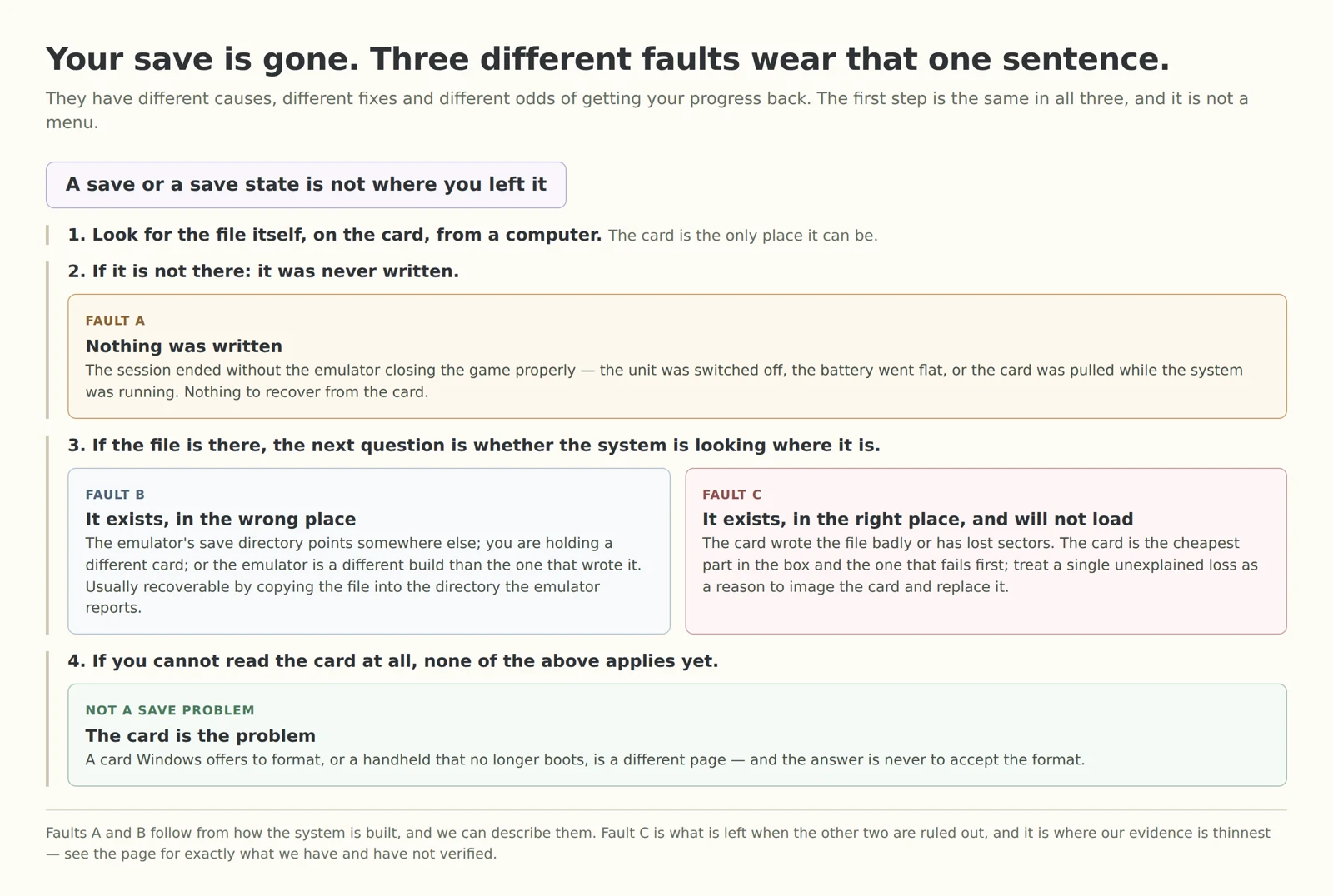
The first step in that tree is not a menu and not a button combination. It is looking for the file, on the card, from a computer. Until you know whether the file exists, everything else is guesswork, and most of the advice you will find online is advice for one branch being applied to another.
There is a catch, and it is the thing that makes this harder than it sounds: the partition your saves are on is the one Windows and macOS will not open. That is the same Linux partition whose unreadable state makes Windows cheerfully offer to format the card — which is why our note on that prompt exists and why the answer to it is never “yes”.
3. When the save actually reaches the card
Fault A is the one we can explain, and the explanation is a window in time rather than a bug.
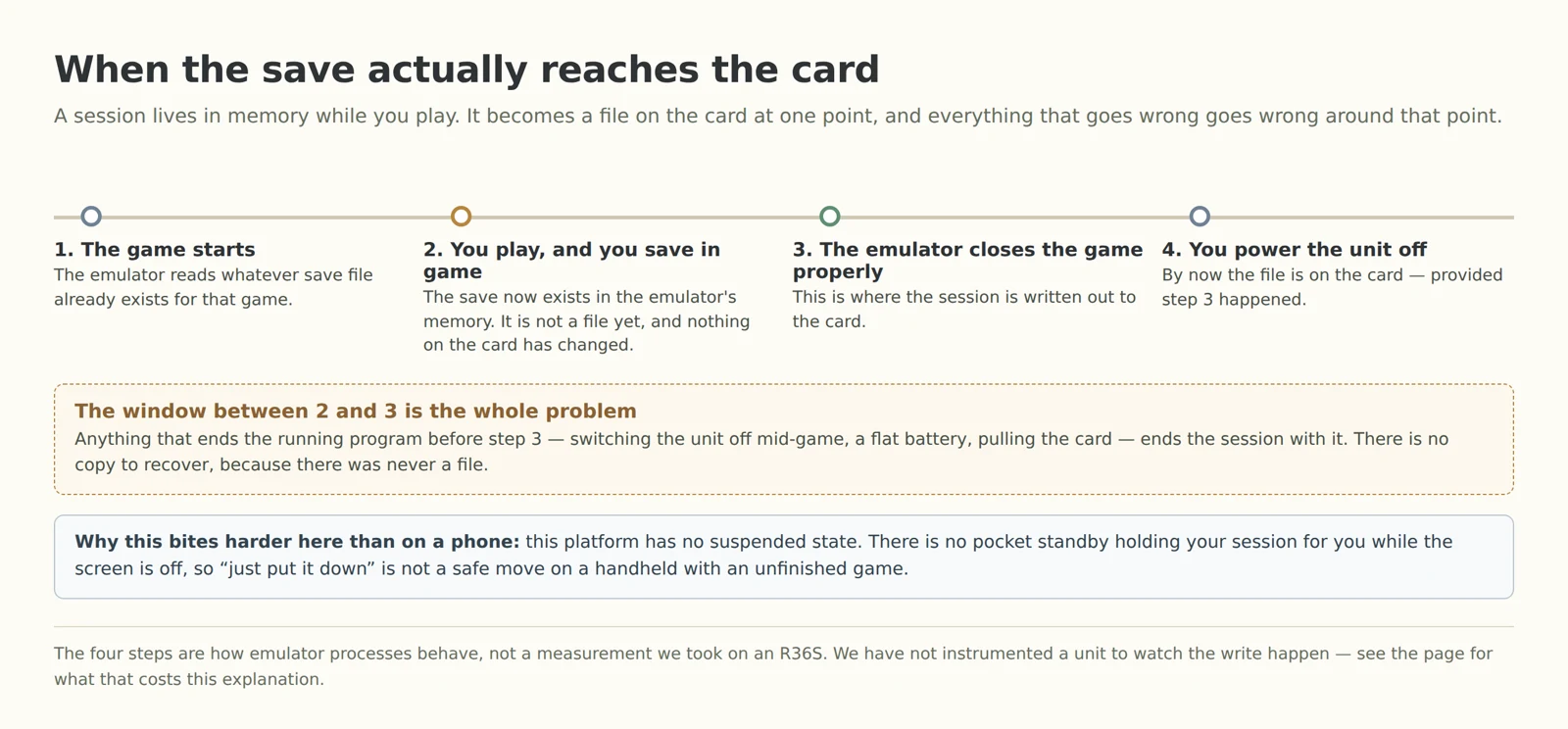
While you are playing, an in-game save lives in memory. It becomes a file on the card when the emulator shuts the game down properly. Anything that ends the running program first — switching the unit off mid-game, a flat battery, a card pulled out while the system is up — ends the session with it, and there is no file to recover because there never was one.
This platform makes that window wider than a phone does, because it has no suspended state. There is no pocket standby holding your game for you while the screen is off, so putting a handheld down with an unfinished session is not the safe move it is on a phone. We cover what that means for the power side in the charging and battery note.
⚠️ Not verified on hardware: those four steps are how emulator processes generally behave, not a measurement we took. We have not instrumented an R36S to watch the write happen, we cannot tell you what any particular build does when it is interrupted, and we are not claiming this explains every reported loss. It explains the shape of one of the three faults, which is all we can honestly claim for it.
4. Backing up your games is not backing up your saves
This is the part that catches people who did nothing wrong. It is also the fault that is easiest to fix permanently.
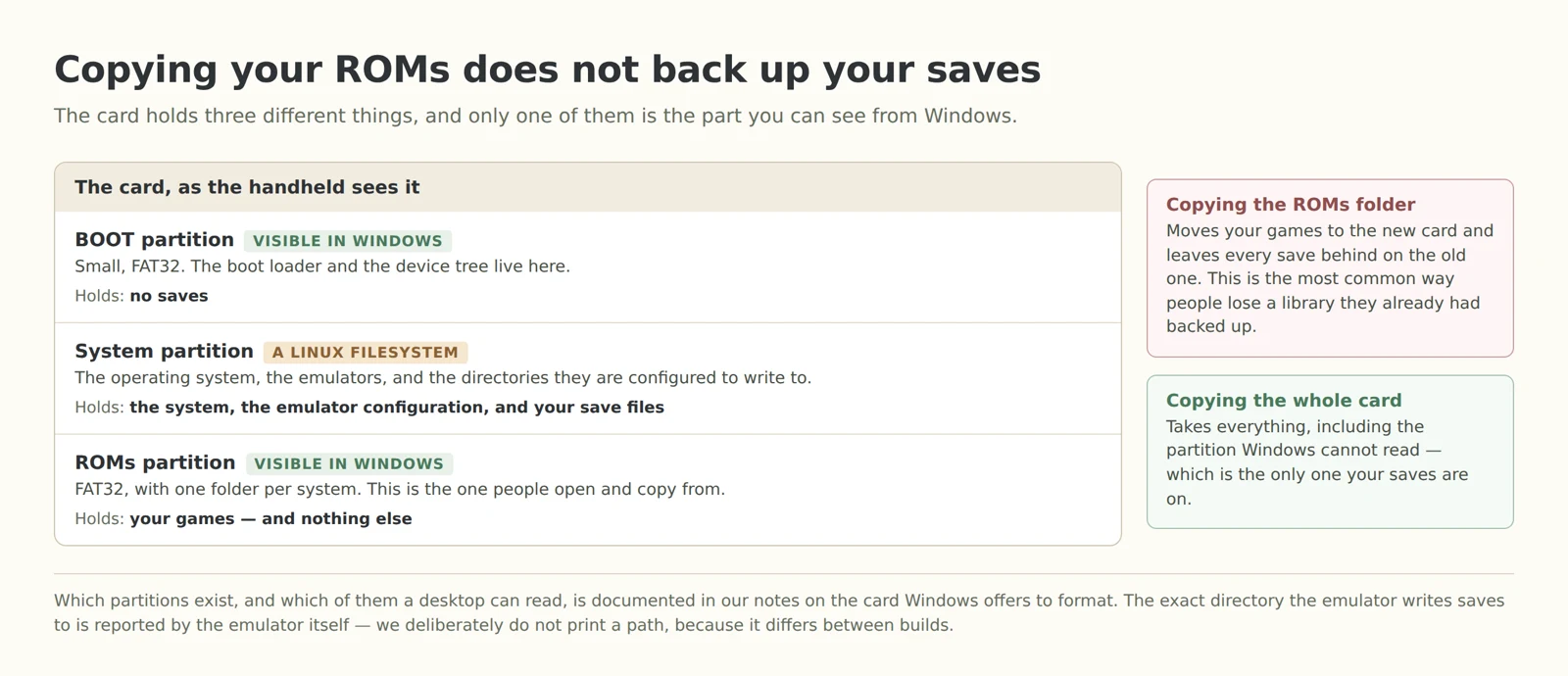
The card holds three different things. The small FAT32 boot partition, which Windows shows you. The Linux system partition, which it does not, and which holds the emulator's configuration and the directories it writes saves into. And the ROMs partition, which Windows does show you, and which holds your games and nothing else.
So the common instinct — move the ROMs folder to a bigger card — carries your library across and leaves every save behind on the old card. If you then format or lose the old card, the saves are gone even though your games are not. Copy the whole card, not the folder: that is the only version of this that takes the one partition your desktop refuses to read. The mechanics of imaging a card without damaging it are in the card article, and how to reach the system side of a running handheld is in the settings article.
5. Checking which fault you have, in order
Find the file first. Read the card from a computer, or reach the system over the network. If the file is not there, you are on fault A and there is nothing to recover — go to section 6. If you cannot read the card at all, stop: that is the card fault, and the article to read is the one on the format prompt.
If the file is there, compare two timestamps. The modification time on the save file against the last time you played. A file that was written today and a save that “vanished” yesterday are two different stories, and the timestamp is what separates them.
If the file is there but the emulator ignores it, find out where the emulator thinks saves go. The emulator reports that itself, under its own directory settings; a file sitting in a different folder from the one it reports is fault B, and fault B is usually a copy-paste away from fixed. The same applies if you have been moving cards or units around: a save written by one build is not automatically picked up by another.
If the file is there, in the right folder, and still will not load, you are on fault C, where we run out of verified ground. What we can say is that the card is the cheapest component in this box and the one most likely to be the weak link, and that a single unexplained loss is a reasonable trigger to image the card and replace it rather than wait for a second one.
⚠️ Not verified: we have not reproduced any of the three faults on a bench, and we have not tested this sequence. It is a way to stop guessing, not a repair procedure, and it comes with no success rate attached.
6. What we cannot tell you
These are the things we would be tempted to write and will not.
A single root cause. We do not have one. Anyone who tells you “the R36S loses saves because of X” with confidence is either describing one of our three branches as though it were all of them, or making it up.
A recovery tool. We have not found one, and we have not tested one. If your save was never written, no tool on the card can recover it, because there is nothing there.
A guarantee. Everything in the next section reduces exposure. None of it is a promise, and we would rather write that sentence than sell against it.
A promise that this is rare. We genuinely do not know how often it happens. The only frequency evidence we have is the word normal in a group message, and that is not a number.
7. What reduces exposure, and why each one does
Each of these maps to a fault above rather than being general advice. If the reasoning does not fit your case, skip it.
Exit a game through the emulator's own quit path, not the power switch. This is the direct answer to fault A: it puts step 3 from the timeline in front of step 4.
Save in game and take a save state as well. Two files with different lifetimes, written at different moments. One of them may survive a session that the other does not, and having both is the cheapest insurance available.
Never remove the card while the system is running. The system partition is mounted while the handheld is on; pulling the card out from under a mounted filesystem is not something any of the above recovers from.
Keep a copy on a computer, of the whole card rather than the games folder. This is the answer to fault B and the only answer we have to fault C: a copy taken while everything worked is the one thing that survives a card that starts losing data.
⚠️ Not verified: these are risk reductions reasoned from how the system is put together. We have not measured how much each one helps, and none of them is a fix.
Questions we get asked
Is this a known bug? Not as far as we can tell, and not in a form anyone has pinned down. The community treats it as normal, which is not the same as it being understood.
Can I get the save back? If it was never written, no. If it is on the card and the emulator is looking elsewhere, usually yes. If it is on the card in the right place and unreadable, we do not know of a reliable way, and we are not going to suggest one we have not tested.
Would a better card prevent it? We cannot say. We can say the card is the cheapest part of the device and the first thing to fail, which is why we suggest imaging it rather than trusting it — but that is a reason to keep a copy, not a diagnosis.
Do all emulators behave the same way? We do not know and we have not tested across them. The three faults above are about where a save lives and when it is written, which applies to any of them; the specifics of any one build are its own.
Should I just not buy this device? If a lost evening of progress would ruin your week, no — and that caveat is already on the revision page rather than buried here. We would not want you to find it only after the fact.
Sources
The two save reports and the ports message are translated by us from a corpus of public Chinese-language handheld groups — roughly 7,500 messages across nine groups with message bodies. It carries no usable time range and no speaker attribution, so nothing here is attributed to a person and nothing here is a frequency claim. The three-part structure of the card, and which of those parts a desktop can read, is documented in our own notes on the format prompt, which in turn reads the partition layout off real cards. The statement that this platform has no suspended state is from our charging and battery note. The description of a save as a file on the card, written out when the emulator closes the game, is how emulator processes generally behave; we have not instrumented a unit to confirm it and it is marked as such where it appears. If you have a reproducible case — ideally with the file timestamps before and after — we would genuinely like to see it, because a topic this thin is one good report away from being answerable.
Related reading
V12, V21 or V30 — the buying decision, including the caveat that we have no root cause for lost saves and say so there too.
Windows says the card needs formatting — how to read a card that a desktop refuses to open, and how to image it before you touch anything.
Settings that will not stay changed — the emulator's configuration layers, and how to reach the system side of a running handheld.
The charging light and the battery — why there is no phone-style standby on this platform.
Games that never show up — when the menu and the card disagree about what is there.