Field note · 11 October 2026
The light is on. The number is not moving.
The short answer
The R36S charges from one port only: the one the board silkscreens DC, rated 5 V / 2 A maximum. If you are charging from a USB-C-to-USB-C cable on a Power Delivery brick, swap to a USB-A-to-USB-C cable on a plain 5 V brick — that single change is the most common fix for a light that is on and a percentage that never moves.
The indicator light is not a battery gauge. It reports what the cable is doing, not how full the cell is: the same LED reads green when the machine is running, red while a cable is attached, and pink-violet on some units. Read the percentage on screen, not the light.
Two questions we will not pretend to have answers to. Whether a fast charger can damage the amplifier chip has no verified answer — we looked. And standby drain is real, but it is not a bug: this platform has no phone-style suspend, so a unit left at the menu or paused mid-game with WiFi up will be flat by morning.
1. What goes wrong, and how it looks
The commonest thing I see is a unit that shows a pink-violet light for a long time and a percentage that never moves — usually after the owner has already tried a second charging head and a second cable and got nowhere. Most of the time the light is simply the wrong thing to read, and the cable is a USB-C-to-USB-C one on a Power Delivery brick.
Then there is the question I have no verified answer to: whether a fast-charging head can destroy the amplifier chip. I looked, and I could not find a case. Section 5 sets out what is engineering fact and what is not.
Standby drain is a common complaint about this platform. Expect four to five hours of actual play on GBA, but leave it sitting on the menu overnight without shutting down and you will come back to an empty battery.
There is no phone-style standby on this platform, which is the usual reason the overnight drain happens.
And then there is the honest third answer: an old cell. A unit that has been in use for two-plus years, with the battery down to the low eighties and not holding much, is not faulty. It is just worn out.
Most of these are really one question — is my unit broken, or am I doing something wrong? — and the answer is usually the second one.
2. There are two ports and they are not interchangeable
The unit has two connectors side by side on the bottom edge. The board silkscreen labels them OTG and DC: OTG is the data port, where a USB WiFi dongle goes, and DC is the charging input rated 5 V / 2 A.
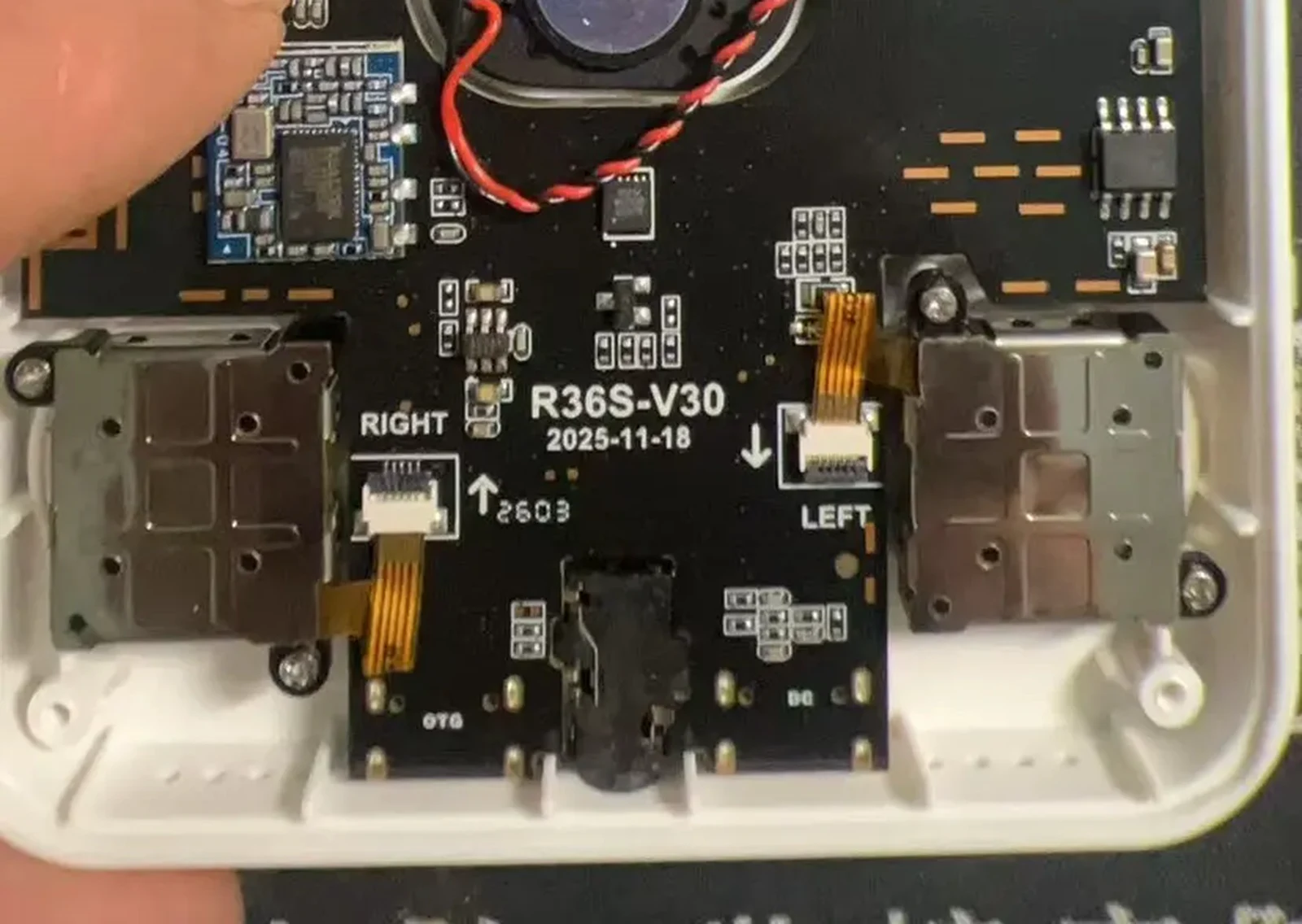
Two facts about "which side" are worth separating, because they are the source of a lot of confusion. Our own specification calls the charging input the left DC port, and the supplier says the same thing in the same words. The board silkscreen labels the pair OTG and DC, and on our sample boards the two labels sit either side of the pair. Which label is physically left of the other depends on whether you are looking at the front of the unit or at the board with the shell off, which is a mirror — and we are not going to pretend we have resolved that for every batch.
So the instruction that survives all of it is the one our own FAQ gives: find the port marked DC, and check that marking on your unit rather than trusting the word "left".
⚠️ Not measured: that a charger in the OTG port lights the indicator while the cell does not charge is a report we have not measured. What we do have is our own photograph of a unit with both ports populated at once, which is exactly how this confusion starts. Treat "try the other port" as a free two-second test, not as a diagnosis.
⚠️ Not independently verified: which connector sits under which label on every batch, and the connector type itself. Our evidence is the silkscreen on our own sample boards plus our own photographs, in which both ports take the same plug shell. Check the marking on your own unit.
3. USB-C to USB-C on a PD charger can deliver nothing
This is a USB-C specification consequence, not an R36S quirk. A USB-C source only applies 5 V to the power line after it sees the right pull-down resistor on the configuration channel. A device whose USB-C-shaped receptacle has no such resistor therefore looks like nothing is plugged in to a modern USB-C source. A USB-A port has no such handshake — it just outputs 5 V — which is why an A-to-C cable works where a C-to-C cable does not.
The practical consequence is surprising and worth stating plainly. A plain 5 V / 1 A or 5 V / 2 A USB-A brick with an A-to-C cable gives a plain 5 V output with no negotiation, which is the configuration our own specification describes. A laptop USB-C brick with a C-to-C cable can sit at 0 V because the charger sees no negotiation. A power bank with a USB-A socket is fine; a power bank with only a USB-C socket has the same problem.
⚠️ Not measured by us: we have not put a meter on our units to record the voltage for each combination, and the pull-down resistor explanation is engineering background rather than a measurement we made. We list the cable swap first because it is free, reversible and reported by other community write-ups as well — not because we have bench data.
Two more supply-side causes are worth ruling out at the same time. Multi-port bricks and power banks commonly drop a port when the load falls below a threshold — often tens of milliamps — and a handheld that is nearly full, or one that has finished charging and is asking for only a trickle, can fall under it. Try a single-port brick, or a different port on the multi-port one. And charge-only cables, worn cables and thin conductors all fail at the current the device wants. The cheapest diagnostic in this whole article is to plug the same cable and brick into a phone and see whether the phone charges at a normal rate. If it does not, you have found the problem without touching the handheld.
4. If the charging path is fine and it still will not charge
A deeply discharged cell. If the battery has been flat for a long time, the pack's protection circuit may have cut the output, and the unit can take a long time on a supply before anything visible happens. Give it a couple of hours on a known-good 5 V supply before you conclude the unit is dead.
Then it is inside the unit. If a known-good supply and a known-good cable on the DC port produce no movement in 30 to 60 minutes, the remaining candidates are the charge circuit, the connector's solder joints, or the cell. At that point the useful action is not another charger — it is the shop you bought it from. A unit bought from us is covered by a 7-day change-of-mind return and by email and Discord support; ask before you open the shell or replace the cell.
5. Is a fast charger dangerous? Honestly, there is no consensus
That fast-charger worry is a question, not a report. Here is what we can say and what we cannot.
What is engineering fact. A compliant USB charger does not push power. Its wattage rating is a ceiling it offers, not a voltage it imposes. Power Delivery only raises voltage above 5 V after an explicit negotiation with the device, and a device that never negotiates never gets more than 5 V from a compliant source. So "a 65 W brick will force 65 W into a 5 V / 2 A handheld" is not how the hardware works.
What we could not establish. We found no verified failure analysis linking a fast charger to a damaged audio amplifier on an R36S — no teardown, no measurement, no reproducible case. What circulates is a question, repeated. And there is a real, documented amplifier-related symptom on this platform that has nothing to do with chargers: WiFi builds have a faint speaker hum, which our own product page discloses and which is why we list it as a tradeoff of the WiFi option rather than a fault.
So: no conclusion, deliberately. If you want the risk-minimising choice, it is also the cheapest one: a USB-A brick at 5 V / 1 A or 5 V / 2 A with an A-to-C cable. Not because we proved fast chargers break anything, but because the device cannot use more, so anything more is pure downside. Do not read that advice as an admission that fast chargers cause damage — we have no evidence either way.
6. “It's flat by morning” — system, or hardware?
There is no phone-style standby on this platform, and that is the usual answer. A handheld running a plain Linux build with a front-end on top does not expose a suspend-to-RAM state with a hardware wake path; the power control on builds of this class is generally wired to a shutdown, not to a suspend. That reading comes from how the platform is put together and from what owners report — the note below says exactly how far our own verification goes. If you leave it at the menu, or paused inside a running game, the processor is still on, the backlight is still on, and if WiFi is up the radio is still up. A night of that is a night of full-power idle draw.
⚠️ Not measured: we have not instrumented a unit to measure current draw in each state, and we have not verified the power-control mapping on all three board revisions. The behavior above is what the platform does as we understand it; the test below is what you can actually rely on, because it measures your own unit.
The honest test has two parts, and they are one night apart. First, shut down properly — through the menu, not the power slider alone — then confirm the screen is black and the indicator is off, and leave it twelve hours. Then boot it and read the percentage. A healthy unit holds most of its charge across a full shutdown. If the indicator is still lit after you shut down, you did not halt it, and nothing is broken.
Even a properly halted unit has some quiescent drain and normal cell self-discharge, so losing a few percent overnight doing nothing is not by itself a fault. What is a fault is a unit that is flat.
The other mechanism is simply an old cell. A unit two-plus years old with the battery down to the low eighties and not holding much is the giveaway here. Cells age. If a unit that used to last four hours now lasts two, no cable, charger or firmware will fix it.
7. What runtime should you actually expect?
Roughly four to five hours on GBA-class games is the number owners consistently give me, and it is their report rather than our measurement. Marketplace listings advertise four to six hours, which is a manufacturer claim. A full charge is commonly said to take two to three hours on a 5 V / 2 A brick, and we have not timed one.
Battery capacity is a case where we will show you our own paperwork instead of a clean number, because our own paperwork disagrees with itself. Our supplier-sourcing record for the pack says 3.7 V, 3000 mAh, 11.1 Wh, with the cell marking JLCL 804069P. Our international-shipping paperwork declares 3200 mAh. Public marketplace listings say 3200 to 3500 mAh. The one thing all of them agree on is about 11 Wh.
⚠️ Not measured: we have not opened units of all three revisions and read the cell label ourselves, so we do not publish a single capacity number as fact. Treat the pack as roughly 11 Wh and judge runtime by what you measure.
The two things that move runtime most are also the two that are free: screen brightness and what you are emulating. 8-bit and 16-bit systems sip power; PS1, N64 and Dreamcast drink it. WiFi up costs you too.
8. How to fix it, top to bottom
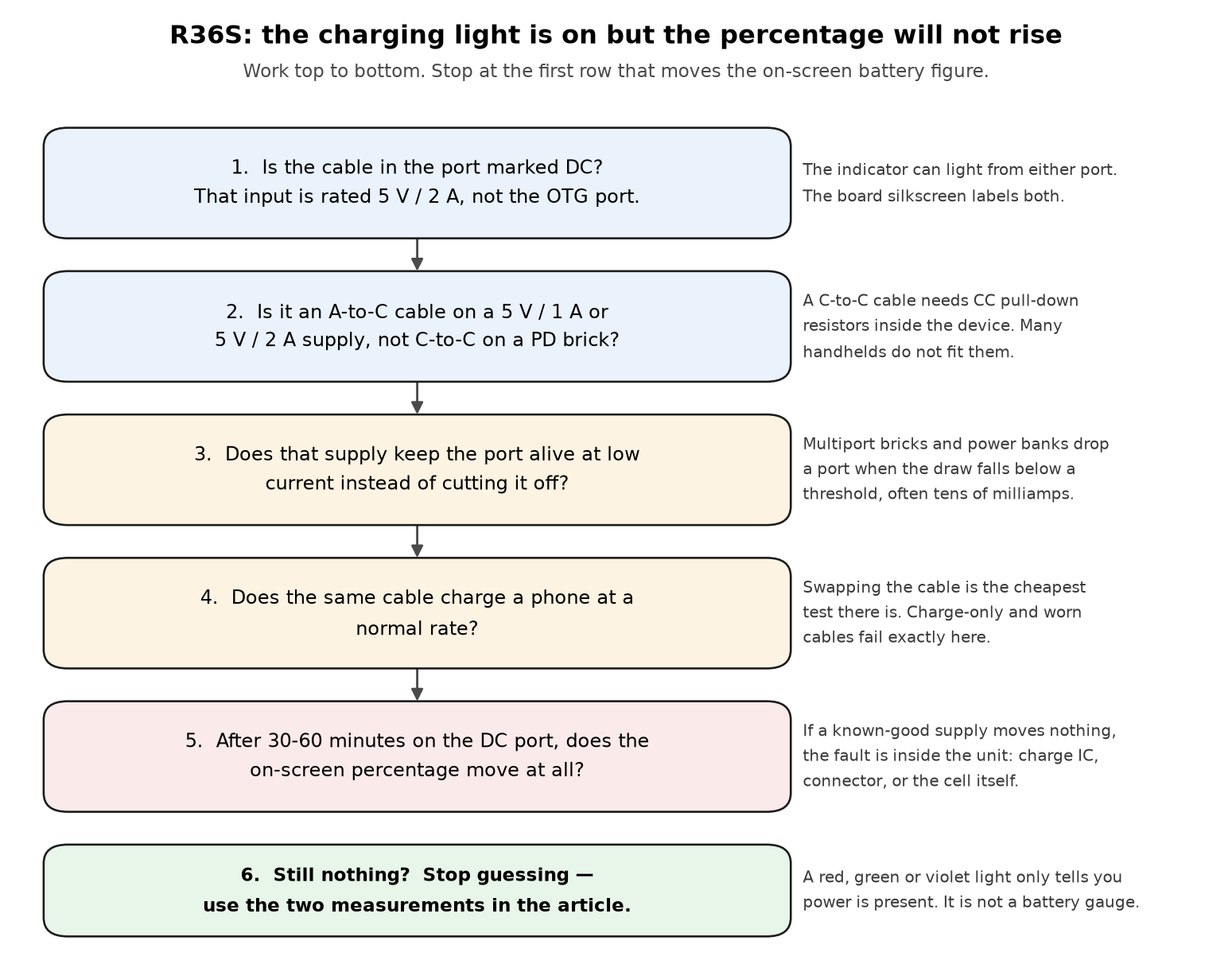
Find the right port. Use the connector the board marks DC. If nothing happens, try the other one anyway — it costs nothing and the two ports are genuinely easy to confuse.
Change the cable to USB-A-to-USB-C if you were using C-to-C. This is the single highest-yield action.
Use a plain 5 V / 1 A or 5 V / 2 A brick, single-port if you have one, and avoid a power bank's USB-C-only socket.
Test the cable on a phone. If the phone charges slowly or not at all, stop here — you have found it.
Give a flat unit 30 to 60 minutes before judging anything. Do not unplug and re-plug every two minutes; you cannot tell a trickle from nothing that way.
Measure, if you have the tools. An inline USB meter between the brick and the cable tells you the truth immediately: a working charge shows volts and current. Measure from a partly discharged battery, because a full one legitimately falls to near zero current.
Check the percentage the honest way. Note it, charge for an hour with the unit off, then boot and compare. If it moved, the charging path works and your problem was the supply or the cable.
Only then suspect the unit. Known-good supply, known-good cable, right port, an hour, and no movement means it is time to contact the seller.
If you want to read it from a shell, this is the standard Linux power-supply interface and ArkOS-based builds are Linux: list /sys/class/power_supply/ and, if a battery node exists, read its capacity and status files.
⚠️ Not measured on the R36S: we have not verified that ArkOS on the R36S exposes a power-supply battery node with those names, and on machines that use a vendor kernel the node may be absent or named differently. If the listing returns nothing, use the on-screen percentage instead — that is what we do.
9. How to verify the fix
You are fixed when, and only when, the number moves. Read the on-screen battery percentage — photograph it if you like, it removes the argument later. Shut the unit down, connect the DC port with your A-to-C cable and a 5 V brick, leave it one hour untouched with the unit off, then boot it and read the percentage again. A rise of several points means the charging path is good and the original problem was the supply or the cable. No rise on a supply you have already proven on a phone means the fault is inside the unit.
For the standby question, verification takes one night: shut it down properly, confirm the indicator is off, leave it twelve hours, then boot. An indicator still lit after shutdown means you never halted it, and that is your drain. Good looks like a percentage that rises on the DC port, an indicator that goes off after shutdown, and a unit that holds charge overnight powered off. Bad looks like a static percentage after an hour, an indicator still lit after shutdown, or a unit that is flat after a night switched off — in which case talk to the seller.
10. The indicator colors we have actually photographed
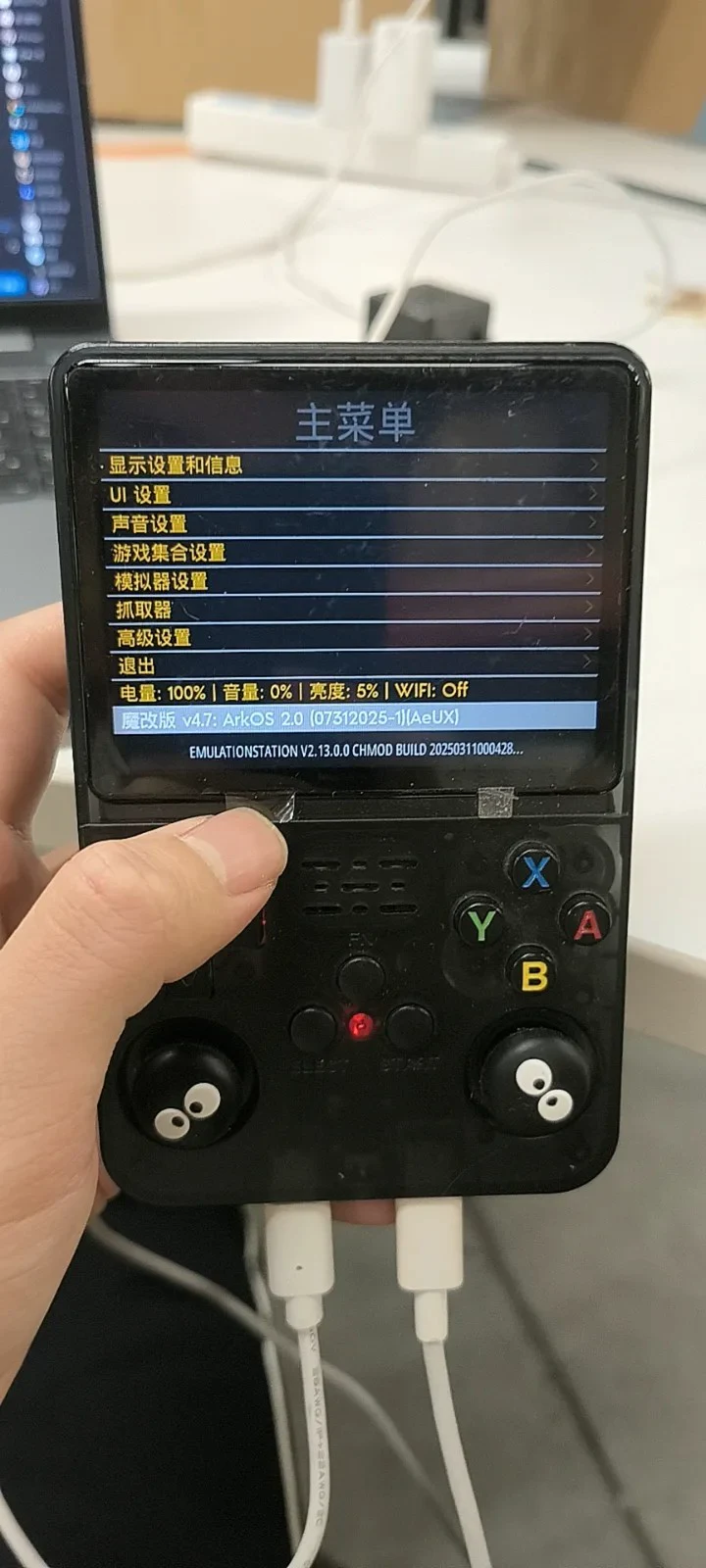
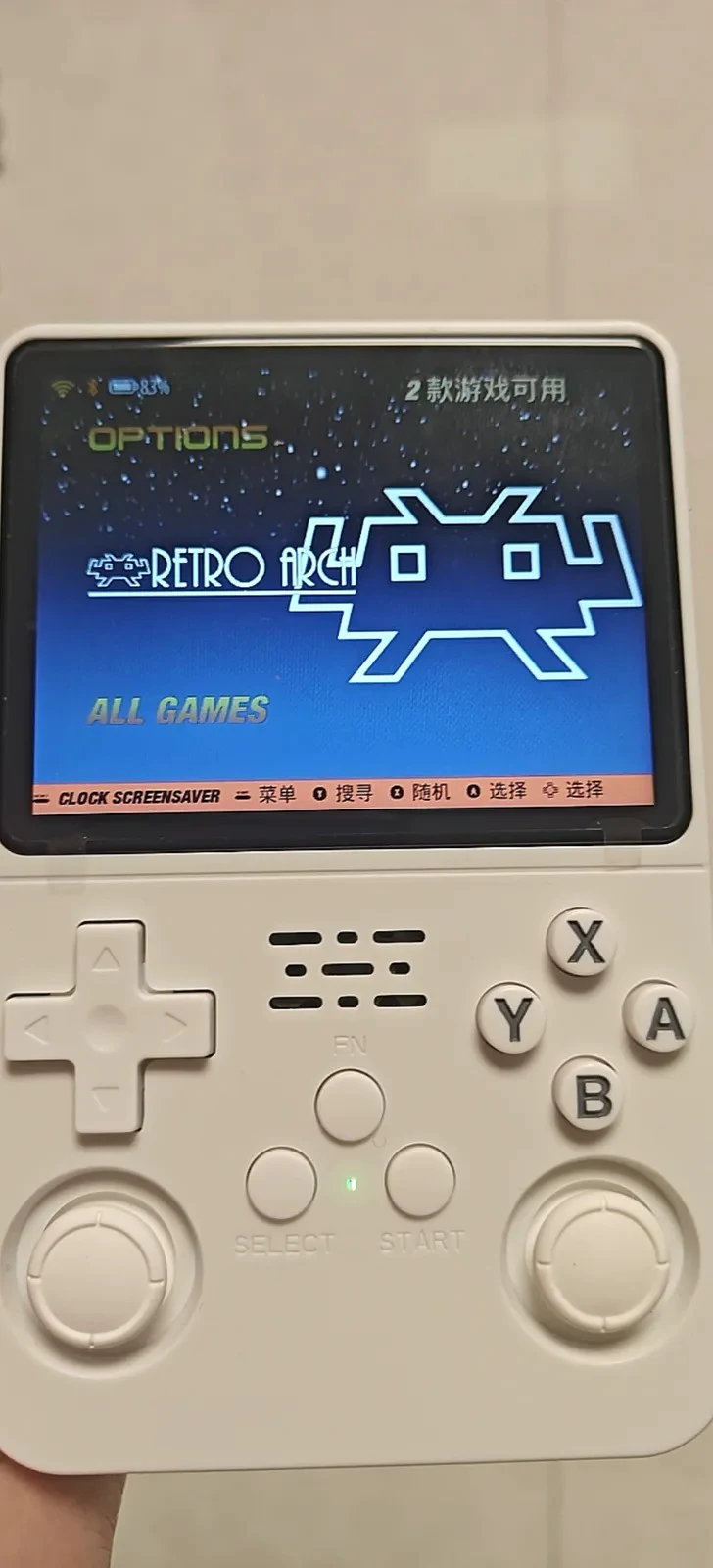
A third photograph of a transparent purple sample shows the same LED position lit green while the unit runs, and a fourth shows two cables attached with a blue-violet indicator. We cannot say which state that last one represents — and that is the point. We do not have a documented color-to-state table for this LED, and we are not going to invent one.
11. How to avoid it next time
Label your charging setup. Keep one USB-A 5 V brick and one A-to-C cable that are the charging kit for this handheld. The failures described above are nearly always a supply that works fine for a phone and cannot charge this device.
Put the cable in the port you have confirmed to be DC, and check the marking rather than the side, because "left" depends on which way you are holding it.
A charging cable is not in the box. Our own product page says so explicitly, and it is worth reading the first steps guide before the first flat battery rather than after.
Shut it down instead of walking away from it. Through the menu, every time, or accept a flat unit in the morning. If you mostly play short sessions, this is the one habit that changes the most.
Turn WiFi off when you are not using it — and note the disclosure before you buy it: WiFi builds have a faint speaker hum, and disabling USB or network settings can require reflashing to get WiFi back.
Check the percentage, not the color. Every false alarm in this article is somebody reading an LED.
Do not buy a bigger battery to cure a charging fault. If the port, cable or supply is wrong, a bigger pack changes nothing — and a worn cell is only a real diagnosis after the steps above.
What we measured, and what we did not
Measured or photographed by us: the charging input rating and the port marking, from our own specification and the board silkscreen in our photographs; the two ports on the bottom edge and the fact that both take the same plug shell, from our own photographs; the indicator reading red while charging and green while running, from photographs of real units; the absence of any documented color table for that LED; and the capacity disagreement, which comes from our own records disagreeing with each other — we published the disagreement instead of picking a number.
Not measured by us: the voltage a C-to-C cable delivers on a PD source, which is USB-C specification behavior plus independent community write-ups; whether fast chargers damage the amplifier chip, where we found no verified case either way and draw no conclusion; the two-to-three-hour charge time and four-to-six-hour runtime figures, which are third-party claims we have not timed; and whether a power-supply battery node exists on the R36S at all.
The diagram in this article is drawn from literal shapes and text by a script in the source repository, not by an image model. The photographs are real photographs of our own sample hardware and of owner-supplied screens, cropped or downscaled only. No price, version number, part number, command or file path in this article is invented.
We sell these handhelds, so read the sections where we tell you not to buy something as the ones that cost us money.
Related reading
V12, V21 or V30 — including the WiFi tradeoffs this article keeps referring to.
Before you buy a bare R36S — the five questions worth asking before anyone takes your money.
First steps, the shop FAQ, returns, and the bare R36S.