Field note · 11 October 2026
The games are on the card, but nothing shows up.
The short answer
On an ArkOS or dArkOS card the games do not live on the small FAT32 partition Windows offers you, and they do not live at the root of the card either. They live in roms/<system>/ on the large exFAT partition whose volume label is EASYROMS — and <system> has to be the exact lowercase folder name the frontend is configured to look at: gba, nes, snes, psx, megadrive.
Get either of those two things wrong and the frontend behaves as if the file was never copied. A system with no recognized games is hidden from the menu entirely, so there is nothing to open and nothing to report.
1. What goes wrong, and how it looks
Three failures come back over and over. Games that were downloaded and copied and simply do not appear. A brand-new owner who understands the idea — download games, put them on the handheld — and still cannot work out where "onto the handheld" actually means. And a wrong belief that takes hold early and causes the rest: that this handheld can only read the FAT32 filesystem, which is only true of one of its three partitions.
What I hear most is a question about a path, not a request for a download link, and that is what this page is: the path, spelled out, with the things that break it.
One warning about advice already circulating. Much of it is written for dozens of devices at once, and some of the most-quoted answers describe Android handhelds, not an R36S: install an emulator APK, grant it permission on first launch, look for the device drive the handheld exposes when you choose "file transfer". The R36S is not Android. There is no APK to install and no per-app permission screen; every emulator is already installed by the system image. Copy-pasting the Android recipe onto an R36S is one of the ways people end up with a card that looks empty.
⚠️ Not tested: we have no Android handheld here, so we make no claim about whether that procedure works there. We only claim that it does not describe the R36S.
2. The card has three partitions, and only one of them is scanned
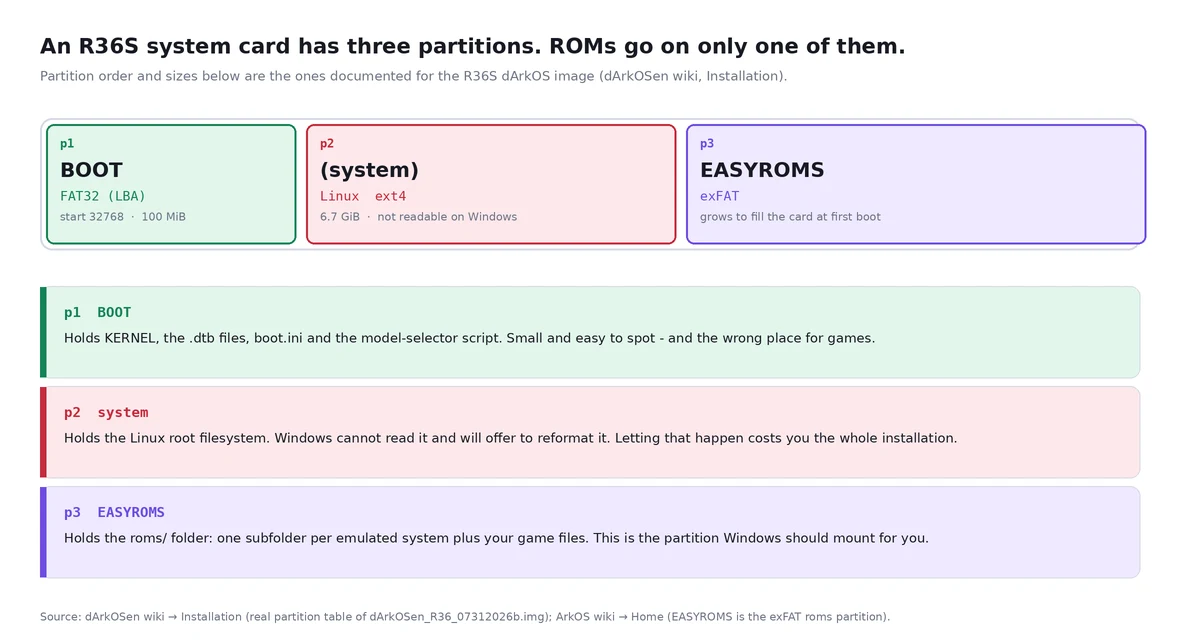
The layout below is the one the R36S dArkOS project documents for its image: an MBR table with three partitions. Partition one starts at sector 32768, is 100 MiB and carries the type code 0c (W95 FAT32 LBA) — that is BOOT, holding KERNEL, the .dtb files, boot.ini and the model selector. Partition two starts at sector 237568, is 6.7 GiB and carries type code 83 (Linux) — the ext4 root filesystem. Partition three starts at sector 14368768 as a 100 MiB placeholder with type code 07, and becomes EASYROMS: grown to fill the card and converted to exFAT on first boot.
So the two partitions Windows can actually read are the small BOOT one and the big EASYROMS one. BOOT is the one that appears instantly and looks like "the card"; it is also the one that must never hold your games, because the frontend only scans EASYROMS/roms. Copying a ROM into BOOT produces a card that is visibly full and a handheld that shows nothing new.
The Linux partition is ext4, which Windows cannot read at all — which is why Windows sometimes offers to reformat a perfectly healthy card. We wrote a separate article about that dialogue: the card that asks to be formatted.
⚠️ Not tested on our own hardware: we did not dump the partition table of a supplier-flashed retail card. The layout above is what the R36S dArkOS project documents for its own image. A card flashed by a different supplier may differ in sizes; the structure — small FAT32 boot partition, Linux partition, large exFAT games partition — is the part that matters.
3. The folder name is the interface
ArkOS ships the folder structure on the card itself, and the authoritative list can be read straight out of the project's own repository rather than trusted to a forum post. That archive contains 122 top-level folders under roms/. The names that matter most, with the core and BIOS file that R36S-class builds map them to:
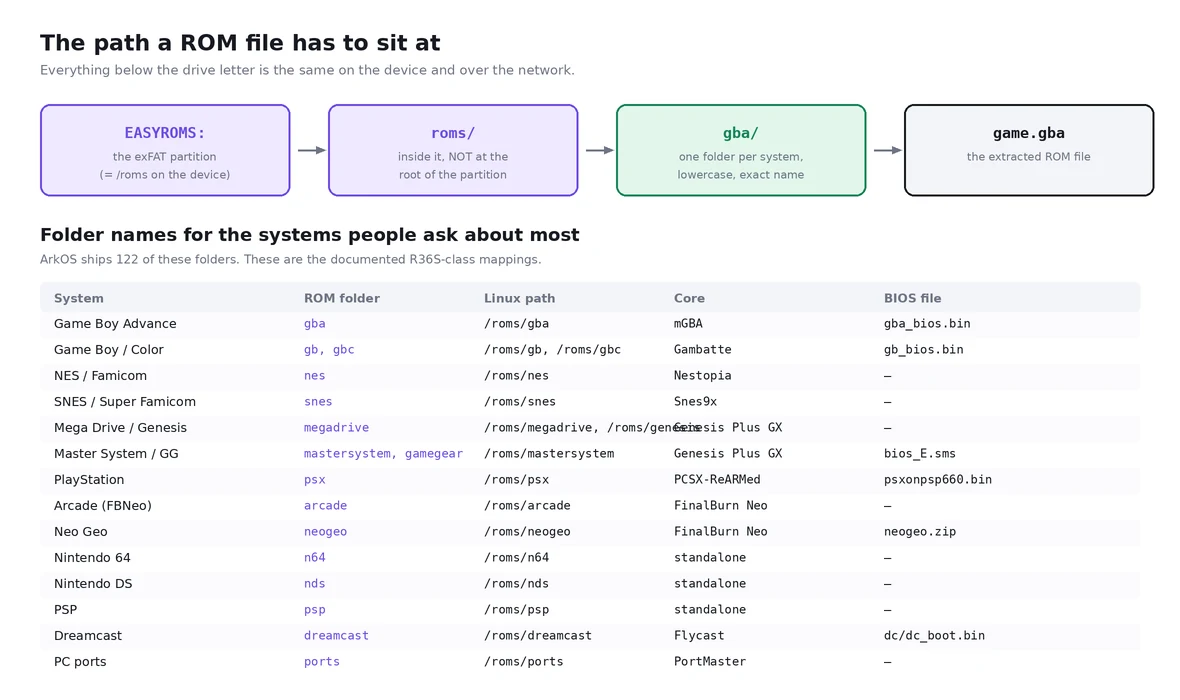
gba → mGBA, BIOS gba_bios.bin. gb and gbc → Gambatte, BIOS gb_bios.bin. nes → Nestopia. snes → Snes9x. megadrive and genesis → Genesis Plus GX. mastersystem and gamegear → Genesis Plus GX, BIOS bios_E.sms. psx → PCSX-ReARMed, BIOS pxonpsp660.bin. arcade and neogeo → FinalBurn Neo, with neogeo.zip as the BIOS. dreamcast → Flycast, BIOS dc/dc_boot.bin. n64, nds and psp run standalone emulators. ports is PortMaster.
Two consequences of this being Linux rather than Windows. Names are case-sensitive: the configuration points at /roms/snes, and a folder called SNES or Snes is a different path that does not exist. And there is no "search my card" mode. Nothing is discovered by content; a file is a game only if it sits under the configured path and its extension is in that system's extension list.
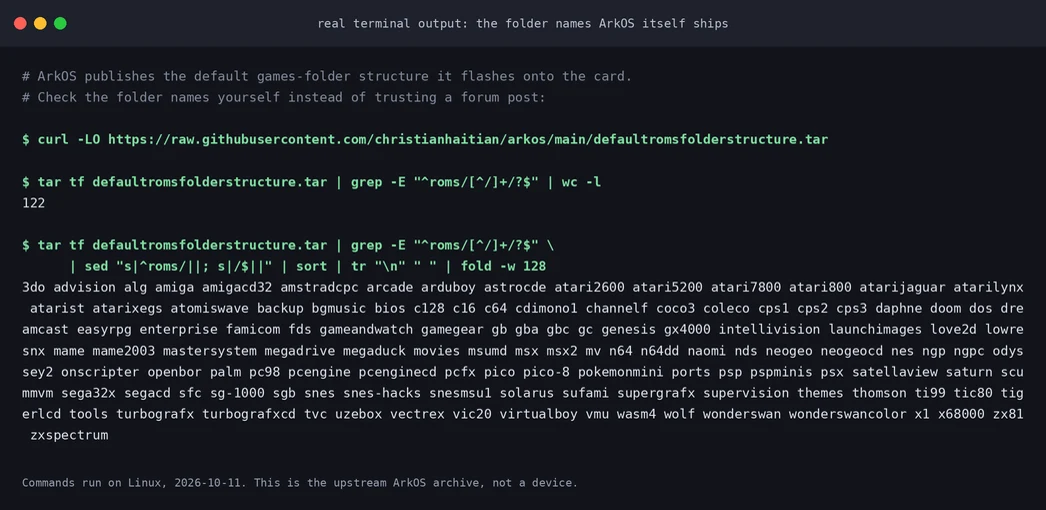
4. A system with no recognized games disappears
This is the part that makes the problem so confusing, and it is worth reading the frontend's own source rather than guessing at it. In the EmulationStation fork ArkOS ships, the visibility test returns false when the displayed game count is zero: no games means the system is not shown at all. Separately, when the configured path is not a directory, the scan gives up immediately and logs a warning instead of continuing.
Read those two behaviors together and the whole symptom set falls out.
One: wrong folder name means the path does not exist, which means zero games, which means the system is hidden. Your GBA games are not "not loading" — the GBA entry is not in the menu.
Two: a wrong extension means the file is not counted as a game, and the same thing happens.
Three: one extra wrapper folder is normally harmless, because the scan recurses into subfolders. This is where the widely repeated advice about never nesting folders is technically wrong, and it sends people hunting for a nesting problem they do not have. What genuinely hurts is displacing the system folder itself: if your extraction produced ROMs/gba/… and you copied the whole ROMs folder into the card's roms folder, you now have roms/ROMs/gba/… and /roms/gba is gone. Recurse or not, that path does not exist.
Four: dot-files are skipped. That is exactly why the ArkOS documentation warns that adding ROMs from a Mac can make them vanish — macOS writes ._game.gba sidecar files alongside the real ones, and the frontend ignores anything whose name starts with a dot.
5. The five failure modes, in the order worth checking
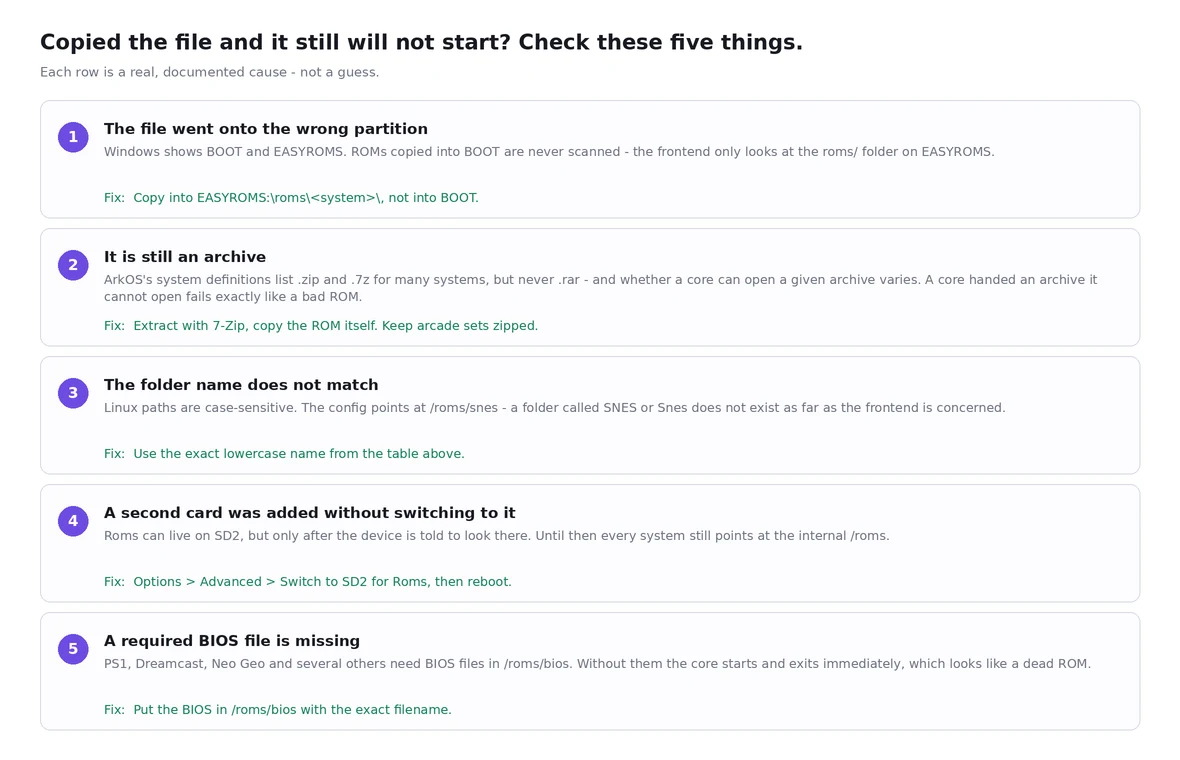
Copied to BOOT instead of EASYROMS. The card looks full and the library is unchanged. Copy to EASYROMS:\roms\<system>\.
Still an archive. A .rar or a multi-part .7z appears in the list, exits immediately and fails on every core. Extract with 7-Zip first, and keep arcade sets zipped.
Wrong folder name or case. The whole system is missing from the menu. Use the exact lowercase name.
Second card fitted but not enabled. Everything still reads from the internal /roms. Use Options > Advanced > Switch to SD2 for Roms and reboot.
Required BIOS file missing. PS1, Dreamcast and Neo Geo start and then die. Put the BIOS in /roms/bios with the exact documented filename.
On the archive case, precisely: ArkOS's shipped system definitions list .zip and .7z as valid extensions for many systems, but .rar is not in any of them, and whether a given core can actually open a given archive varies by core and by how the archive was packed. That is why "I tried every core" goes nowhere — the failure is in the container, not the core. Note the deliberate exception: arcade sets for FinalBurn Neo and MAME are distributed as zips and must stay zipped.
⚠️ Partially verified: the extension lists above were read from the es_systems.cfg published in the ArkOS repository — the 2020 RG351-era file, 78 systems. We did not extract es_systems.cfg from an R36S card, so treat the exact per-system list as "this is how ArkOS builds its lists", not as "these are the bytes on your card".
6. What format the card should be
One claim worth correcting: that the handheld can only read the FAT32 filesystem. The boot partition is indeed FAT32 — that part is true. But the games partition, EASYROMS, is exFAT: ArkOS's own documentation says the image grows and converts the placeholder partition to exFAT on first boot, and that you should look for a drive letter literally named EASYROMS. A second card used for games may be exFAT, EXT4, FAT, FAT32 or NTFS; ArkOS documents EXT4, exFAT and NTFS as the better choices, and warns that an EXT4 second card must have its contents owned by user and group 1002:1002 or some systems will fail to launch games.
So the machine is not FAT32-only. Where the belief comes from is usually that a card was formatted with something the kernel does not mount at all, so the partition shows up on the PC and never on the handheld.
⚠️ Not tested: we did not test every filesystem in the second slot on real hardware. The list above is quoted from ArkOS's own FAQ.
There is one real limitation worth knowing before you pick FAT32 for a large card: FAT32 cannot hold a single file larger than 4 GiB. PS1, Dreamcast, PSP and DVD-based images routinely exceed that, and exFAT does not have the limit. This is a property of the filesystem, not of the R36S.
7. How to fix it, in order
Step 0 — know which of your two cards is which. Power off completely. On the R36S the system card and the game card sit in different slots; plug the system card into your PC with a reader.
Step 1 — find the right partition. Open the card. You should get one small drive (BOOT, about 100 MB) and, on Windows 10 1703 or newer, a second, much larger drive labelled EASYROMS. Do not work inside BOOT. If EASYROMS has no drive letter, open Disk Management, right-click the partition carrying that label, choose Change Drive Letter and Paths, then Add. That is the fix ArkOS and dArkOS both document for a games partition that is invisible.
Step 2 — copy to the right depth. Inside EASYROMS you should already see a roms folder. Open it and match the system: EASYROMS:\roms\gba\ for Game Boy Advance, EASYROMS:\roms\snes\ for SNES. Do not create EASYROMS:\roms\ROMs\gba. Do not put files at EASYROMS:\ directly. And do not delete the folders that are already there — the NDS and PSP folders in particular contain files the emulators need, even before you add a single game.
Step 3 — extract before you copy. Downloaded packs arrive as .rar, .7z or split archives. Extract with 7-Zip starting from the first part, then copy the resulting ROM files. Put required BIOS files into EASYROMS:\roms\bios\ using exactly the documented filename.
Step 4 — if you are using a second card, enable it on the device. Eject safely, insert the card, boot, then use START for the frontend menu, then Options > Advanced > Switch to SD2 for Roms. Shut down, move your games onto the second card — exFAT recommended, and label it something unique such as ROMS2, not EASYROMS — and boot again. Two documented gotchas: once you are on a two-card setup both cards must be present for the device to boot, and the second card is where your BIOS files now belong.
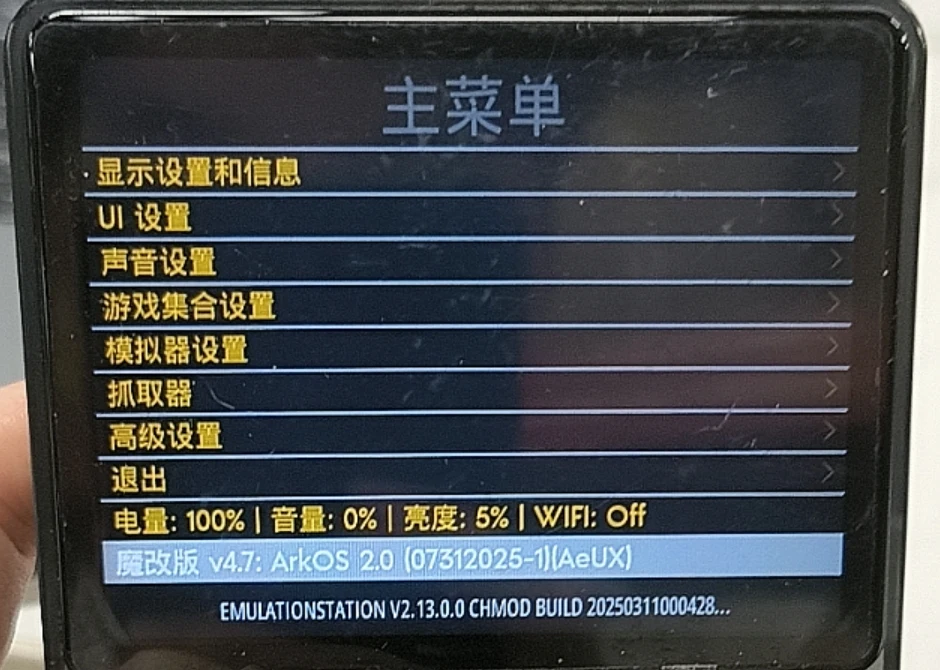
Step 5 — if Windows cannot see either partition, stop using the card reader on Windows. ArkOS documents two ways to add games that never touch a card reader. Options → Enable Remote Services turns on SSH and Samba, so you can drop files straight into /roms/… over the network, and the built-in FileBrowser manages the roms folder from a web browser.
8. How to check it worked
Count the games from inside the system. Boot the handheld and look at the system list. A system that is absent is a path or extension problem. A system that is present but whose games exit immediately is an archive, BIOS or core problem.
Check the partition labels, not the drive letters. On Linux, with the card inserted, run lsblk -o NAME,SIZE,FSTYPE,LABEL. You should see something like a 100 MB vfat partition labelled BOOT, an ext4 partition with no user label, and a large exfat partition labelled EASYROMS. If the big partition's label is not EASYROMS, you are not looking at a system card. On Windows, Disk Management shows the same thing in the Volume label column.
Check the file you just copied is really where you think it is. Sorting the folder by type and seeing a .rar sitting in roms\psx\ is the fastest way to catch mistake number two.
Check that a "missing" system is genuinely empty. Put one known-good, unzipped, correctly named ROM into the folder, reboot, and see whether the system reappears. Because empty systems are hidden, one correct file brings the whole entry back.
9. How not to step on this again
Two cards, two jobs. Keep the system card untouched and put games on the second card. It makes the games card a plain data card you can format and rebuild without risking the installation, and it makes whole-card backups far less painful.
One folder per system, never a folder per pack. Extracted packs often arrive as pack-name/gba/…. Copy the contents of the pack's system folders into the card's matching folders, rather than copying the pack's root in.
Never let Windows "fix" a card it cannot read. If Windows offers to format a partition on your R36S card, cancel. The partition it cannot read is the Linux one, and formatting it destroys the installation, not just some games.
Buy a real card from the start. ArkOS's own instructions: minimum 8 GB, 16 GB or more strongly recommended, and no low-quality or no-name cards — they fail quickly and produce inconsistent emulation behavior.
Keep arcade sets zipped, extract everything else, and if you must use a Mac, clean up the ._ sidecar files before ejecting.
Expect to reboot after adding games. The library is scanned at startup; there is no reliable refresh that skips this.
Where to get games
We do not link to ROM sites, and we are not going to pretend that "just download the 128 GB pack" is a neutral recommendation — it is a common way to end up with a card full of files that do not launch. The lawful short version is your own dumps of cartridges and discs you own, homebrew and public-domain releases, and the many open-source ports that ship through PortMaster directly on the device. The mechanics on this page apply either way.
The handhelds we sell are bare: no games, no memory card, no game files. That is a deliberate choice, and it is explained on the R36S product page and in the first steps guide.
Sources
The 122 default folder names come from the defaultromsfolderstructure.tar archive in the ArkOS project, verified by listing it on 11 October 2026. The per-system folder, path, core and BIOS file come from the dArkOSRE-R36 wiki. The partition table and sizes come from the dArkOSen-R36S wiki installation page. The EASYROMS behavior, the drive-letter fix, the folder-deletion warning, the SSH and FileBrowser transfer routes and the macOS ._ warning come from the ArkOS wiki and FAQ. The recursive scan, the hidden empty systems, the skipped dot-files and the extension matching were read in SystemData.cpp in the EmulationStation-fcamod frontend on 11 October 2026.
The failures in section 1 are the ones owners actually bring us, and the ones we have reproduced on our own units while writing this. They are described here as patterns rather than as measured frequencies — we have not counted how often each one occurs.
Related reading
The card that asks to be formatted — the other side of the same partition table, and what to do before you let anything write to the card.
Black screen after flashing — when the card is fine and the device still will not show a picture.
First steps, the shop FAQ, and the bare R36S.