Field note · 11 October 2026
The screen stays black, and nothing tells you why.
The short answer
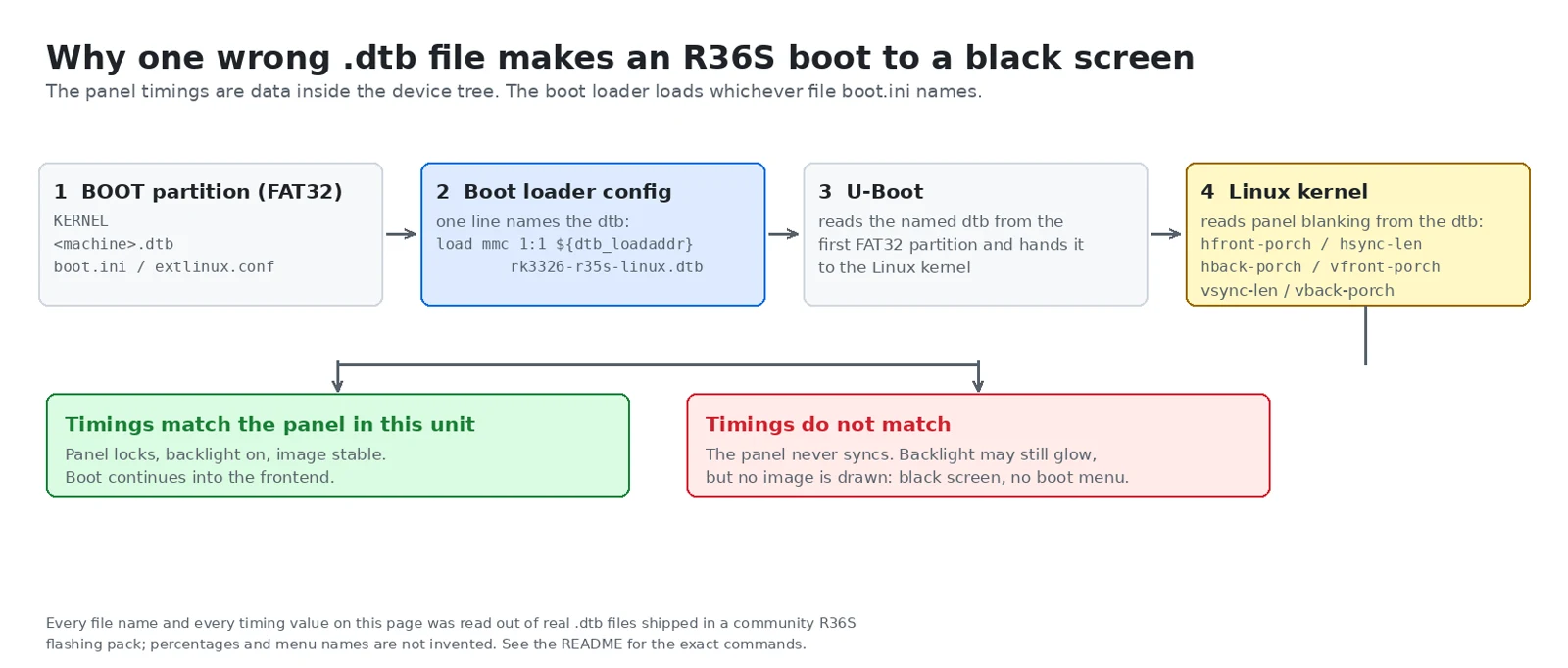
The screen is described by a device tree blob, a .dtb file sitting on the FAT32 BOOT partition. The boot loader loads exactly one file, named in boot.ini or extlinux/extlinux.conf. If that file describes a different panel variant than the one fitted to your unit, you get a black screen and no error. The fix is to put the correct .dtb on the boot partition from a PC, and this usually does not require re-flashing the whole image.
Everything below was read out of real files: a community R36S flashing pack, the .dtb binaries inside its Windows dtb_selector tool, and the public source of the community firmware projects. Anything we could not verify is labelled.
1. What goes wrong, and how it looks
The shape of it is always the same. A new unit arrives, the owner flashes it several times with different images and tries several device trees, and every attempt gives a black screen. On a V30 that is worse, because there is no obvious place to look — nothing in the usual file dumps names the board, and no image ships one specifically for it.
The black-screen reports that reach us have the same shape: the image is fine, the dtb is not. There is no matching file for that board's panel, or the wrong one was picked. We describe that as the pattern we keep seeing, not as a measured frequency — nobody has counted how often a black screen turns out to be something else.
One of the analyses I have seen went further. It used a device-tree analysis tool that reported a partial match: the same screen parameters but a different file hash. It also printed the battery design and maximum capacity it had found inside the file, and then suggested a fallback list of device options to try in order. Two things are worth reading off that output. A tool exists that identifies a panel by parameters stored inside the .dtb itself. And the fallback list included R36XX, R36H and O30S — different machines, not R36S panel variants. That is the shape of the problem: you are matching one small file against a family of closely related boards.
2. What a device tree blob is, and why one letter of it matters
The R36S runs a Rockchip RK3326. On ARM Linux the kernel does not probe the hardware by itself the way a PC does; it is told what the hardware is by a device tree blob, a flat binary compiled from a text source by dtc. The boot loader passes that blob to the kernel. If a node is missing or wrong, the kernel boots happily and the affected hardware simply does not work — no error, no panic, no beep.
That is exactly why a wrong device tree shows up as a black screen rather than a boot failure. The pack we inspected ships 85 files inside its selector tool, 40 of them .dtb, spread across the board families R36s, G80C, G80XF, R36Max, R36Pro, Mymini, U8, Xf35H and Xf40H. Pick the wrong one and the kernel comes up fine on the wrong display description.
3. The panel description is where the variants differ
Four .dtb files in the pack are labelled Panel 1 to Panel 4 for the original R36S. We parsed them, and this is what is inside.
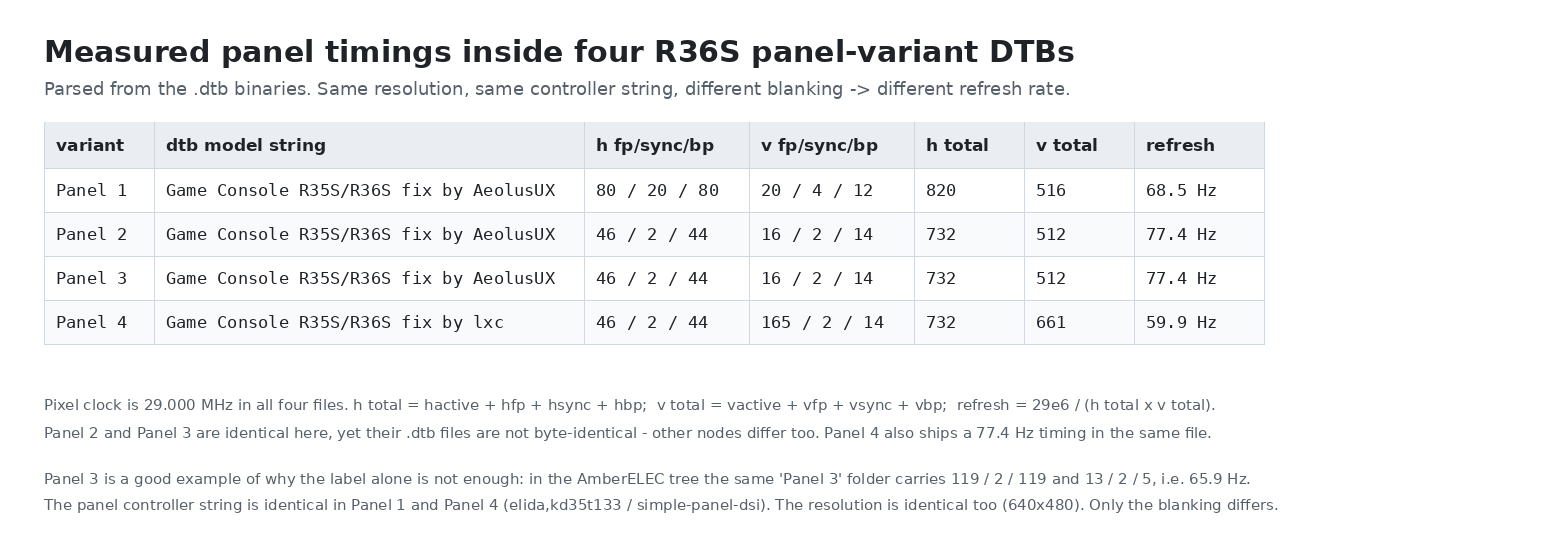
Panel 1 carries the model string Game Console R35S/R36S fix by AeolusUX, with horizontal front, sync and back porch of 80, 20 and 80, vertical of 20, 4 and 12, giving totals of 820 by 516 and a refresh of 68.5 Hz. Panel 2 and Panel 3 both use 46, 2 and 44 horizontally and 16, 2 and 14 vertically, giving 732 by 512 and 77.4 Hz. Panel 4 carries the model string Game Console R35S/R36S fix by lxc, with 46, 2 and 44 horizontally and 165, 2 and 14 vertically — totals of 732 by 661 and 59.9 Hz.
Read that again, because it contains the whole trap. The resolution is identical in all four: 640 by 480. The panel controller is identical in at least Panel 1 and Panel 4 — both declare the same controller alongside a simple panel node. The pixel clock is identical: 29.000 MHz in all four. Only the blanking intervals differ, which changes the totals and therefore the refresh rate.
A MIPI-DSI panel only accepts a signal whose blanking and total line counts it can lock to. Feed a panel the Panel 1 timings when it wants Panel 4 timings and there is no error message anywhere in the chain — the display just stays dark. The backlight may still come on, which is why people describe it as "the screen is on but black".
A second trap: the label alone is not enough. In the same pack, the AmberELEC tree's Panel 3 folder carries a different timing set again — front porch, sync and back porch of 119, 2 and 119 horizontally and 13, 2 and 5 vertically, which is 65.9 Hz. So "Panel 3" is not one universal timing; it is Panel 3 for that firmware family. And a third trap: Panel 2 and Panel 3 have identical timing values, yet their .dtb files are not byte-identical. Something else in the tree differs too. Never assume two files are interchangeable because the visible numbers match.
4. Why V12, V21 and V30 do not share one device tree
The community treats the R36S family as two independent axes, and this is the single most important thing to understand before you flash anything. The board revision — V12, V21, V30 — is which machine you have, and it determines the full device tree: memory, WiFi pads, audio amplifier, joystick wiring, battery parameters. The panel variant — Panel 1, 2, 3, 4 — is which LCD happens to be fitted to that particular unit. Two units of the same board revision can have different panels, because the factory swaps panel suppliers.
The device tree you need is a point in that two-dimensional grid, and nothing on the outside of the shell tells you the second coordinate. That is why "I tried many dtbs and they all black-screened" is such a common thing to hear: with four panel variants and several board families, random guessing has a poor hit rate.
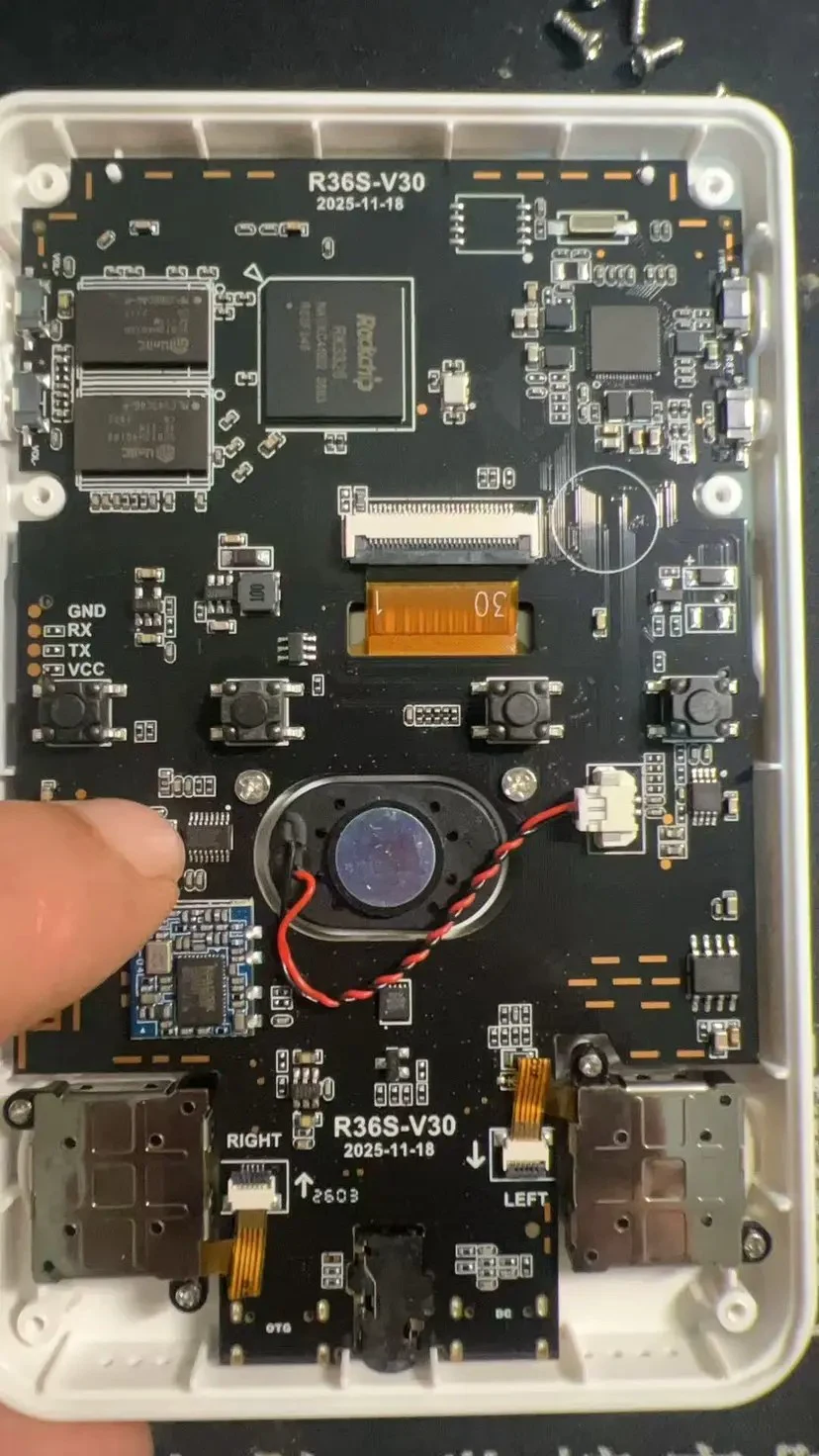
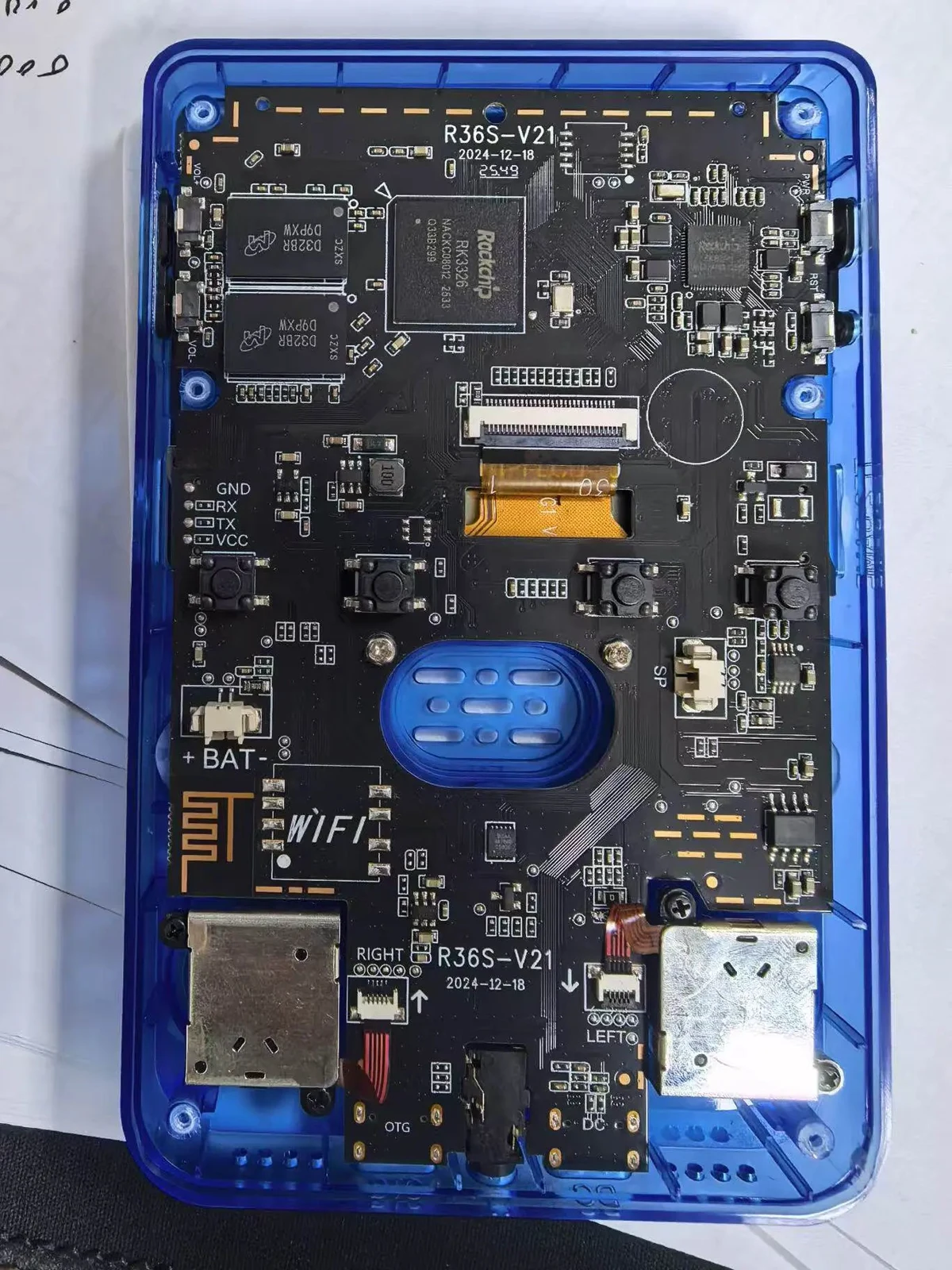
What we could verify, from real files and photographs. The pack's selector tool asks for machine type, then system, then — for the original R36S only — screen type Panel P1 to P4. It does not ask "V12 or V21 or V30". For the R36S original on ArkOS the file the boot loader names is rk3326-r35s-linux.dtb, and it differs per panel: four different hashes, four different timing sets, two different model strings. A note distributed with the flashing material for the original V12 states plainly that the original V12's device tree filename is rk3326-gameconsole-r36s-v4.dtb — that is one verified V12 data point. And real board photographs of a V30 and a V21 unit show the silkscreen marking the revision directly: R36S-V30 / 2025-11-18 and R36S-V21 / 2024-12-18. Both boards carry a Rockchip RK3326 and two memory packages, and the V21 board has WIFI pads marked on the left edge. So the board revision is readable — but you have to open the shell.
⚠️ Not verified: we found no authoritative public source that maps V12, V21 and V30 one-to-one onto specific device tree filenames or specific panel variants. Statements circulating online — for example "for V30 you flash the latest arkos4clone" — are consistent with the V30 shipping later and needing newer drivers, but we did not confirm a mapping table, and you should not treat one as existing. If a seller or a forum post hands you a "V30 equals X" table, treat it as unconfirmed.
⚠️ Not verified: the device tree pack we inspected is a community compilation. We do not know its exact provenance, and it is not the same thing as an official firmware release.
5. How to find out which board and panel you have
Board revision: open the shell. The revision and a date are printed on the PCB next to the shoulder buttons, in the form R36S-V21 or R36S-V30. This is the only reliable method we have seen evidence for. The shell color does not tell you the board.
Panel variant: you cannot read it off the outside and you cannot read it from the silkscreen. The practical options are these. Use the firmware project's own device-identification tool — the ArkOS4Clone project ships one and links to a web tool for it. Its supported-device list enumerates the R36S original as six separate screen entries, plus separate families for clone boards and for the "SoySauce" variants; the filename I have seen shared matches the SoySauce family. Failing that, try the candidates for your board family in order and stop at the first one that gives a stable, correctly framed picture — which is exactly the workflow the analysis tool recommends.
6. How to fix it: three regimes, and they disagree
Mixing these up is how people break their setup. Find your row first.
ArkOS4Clone, the currently maintained line: a console-detect mechanism picks the device from the device tree files present. You do not rename anything. The project states it outright: "Device detection handled by console-detect, do not rename DTB files."
ArkOS-R3XS and older community packs: a boot.ini on the boot partition names one device tree file. The line in boot.ini and the file on the partition must agree. Some packs expect a fixed filename, which is why the "replace the file, keep the name" method exists.
Rocknix builds: also a boot.ini, and you edit the filename on the dtb_loadaddr line.
On the ArkOS4Clone route, the official guide gives a Windows path — flash the release image, run the selector tool, select your device, then select the battery driver version when prompted, then reboot — and a manual path for Linux and macOS: mount the boot partition, copy boot.ini and the two .dtb files from the matching consoles/ folder to its root, copy the matching kernel Image, copy the logo bitmap, unmount, insert the card and reboot. Two notes from that project explain a lot of "it still won't boot": connect the charger before powering on and make sure the battery voltage is above 3.3 V, and do not mix device trees from stock systems or other distributions with the ArkOS4Clone tooling.
On the manual boot.ini route, the device tree is an ordinary file on the first, small, FAT32 partition. Any PC can mount it. If Windows does not show the boot partition, assign it a drive letter from Disk Management. Then edit boot.ini in a plain-text editor and change only the filename on the line that loads the device tree, so that it matches a .dtb file you actually copied onto the same partition. Do not change paths, addresses, bootargs or the boot line. Save as ASCII or UTF-8 without a byte-order mark.
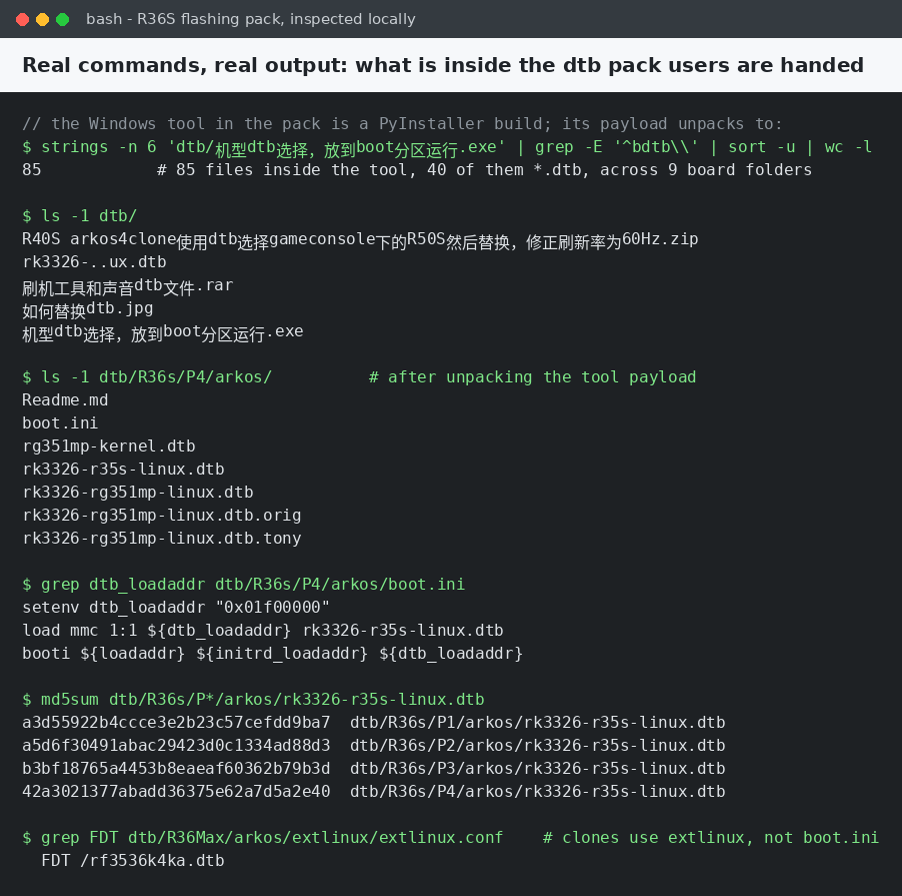
The V12 note that ships with the flashing material says the same thing in the community's own words, and gives one concrete example for the original V12: change the line naming rk3326-rg351mp-linux.dtb so that it names rk3326-gameconsole-r36s-v4.dtb instead. Note what the stock line names — an Anbernic RG351MP device tree. That is the origin of the whole mess: these images inherit the RG351MP tree as their default, and every R36S owner is expected to point that line at their own panel.
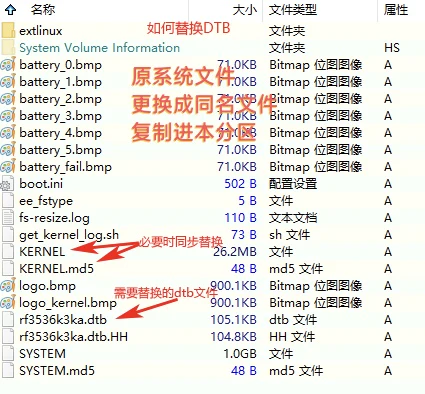
Some packs do not let you choose the name at all; the boot loader looks for one hard-coded file. The real boot partition of such a pack carries a device tree named rf3536k3ka.dtb, and the pack's own instruction is to replace it with a same-named file. In that case you rename your correct .dtb to exactly the expected name and copy it in. That is the opposite of what ArkOS4Clone wants. Check which firmware you are on before you touch anything.
Some builds boot through an extlinux/extlinux.conf instead. There the device tree is named on the FDT line. Same principle: one line, one filename, and that filename must exist on the boot partition.
7. Before you conclude it is the device tree at all
Two things look identical to a device tree mismatch but are not. First boot after flashing is slow — the card is resized and the root filesystem is expanded, and the community tutorial for this workflow says to give it about three minutes on the first power-up before deciding anything is wrong. A weak or absent battery will stop some boards coming up at all, no matter how correct the device tree is.
8. How to verify you got it right
The screen locks and stays locked. A correct file gives you a picture that does not roll, tear, shift sideways or sit cropped with a black band on one edge. A wrong file usually gives you nothing at all, but a partially wrong one can give you a distorted image — treat that as still wrong.
The image survives a reboot. If it comes up once and not again, suspect a file that was written badly or a card that is failing, not the device tree choice.
The system identifies itself. The device tree is exposed by the running kernel, so cat /proc/device-tree/model — or the equivalent path under /sys/firmware/devicetree/base/model on many kernels — prints the model string. For the panel-variant files we parsed, that reads Game Console R35S/R36S fix by AeolusUX for Panels 1 to 3 and Game Console R35S/R36S fix by lxc for Panel 4. The file content is the raw property value, so it may end with a NUL byte your terminal does not show.
The system's own rewriter agrees with you. The boot.ini shipped in the pack carries a comment saying that changes made to it are overwritten on every upgrade, that permanent changes belong in boot.ini.default, and that after editing that file you run the bootini command to rewrite the live one. So on that build, a change that keeps reverting after an update is not a mystery.
⚠️ Not verified on hardware: we confirmed those model strings by parsing the .dtb binaries directly. We have not run those commands on a live R36S, so treat the exact output, including trailing bytes, as expected rather than observed. Nor have we run the bootini command on a device — we are quoting the file's own comment.
9. How not to step in it again
Back up the working pair. Once the screen comes up, copy the .dtb you used and the boot configuration to your PC, into a folder named after the machine. This takes ten seconds and saves an evening.
Never format or repair the boot partition. It is FAT32, so Windows will cheerfully offer to fix it. Let it, and the boot loader stops finding anything.
Expect the image to carry the wrong default. A boot configuration that names an RG351MP device tree is the normal starting state, not a bug. Your job is to change exactly that filename.
Do not mix device tree trees between firmware projects, and do not assume two units are the same — board revision and panel variant are independent, so buying a second R36S is not a reason to skip the identification step.
A black screen is not automatically a brick. Because the device tree is a plain file on a FAT32 partition, the usual failure is repaired by putting the right file back from any PC. Treat "brick" as a last hypothesis, not a first one.
⚠️ Not verified: we have not tested every failure mode. Interrupting the first-boot resize, flashing a wrong kernel, or a card that is genuinely failing are different problems, and a wrong device tree is not a license to assume any black screen is harmless.
The image is not the game pack. A firmware image is the operating system plus emulators. Games live on the roms partition, in per-platform folders, and you copy them in yourself — see our note on games that never show up.
10. One more thing worth knowing about the pack
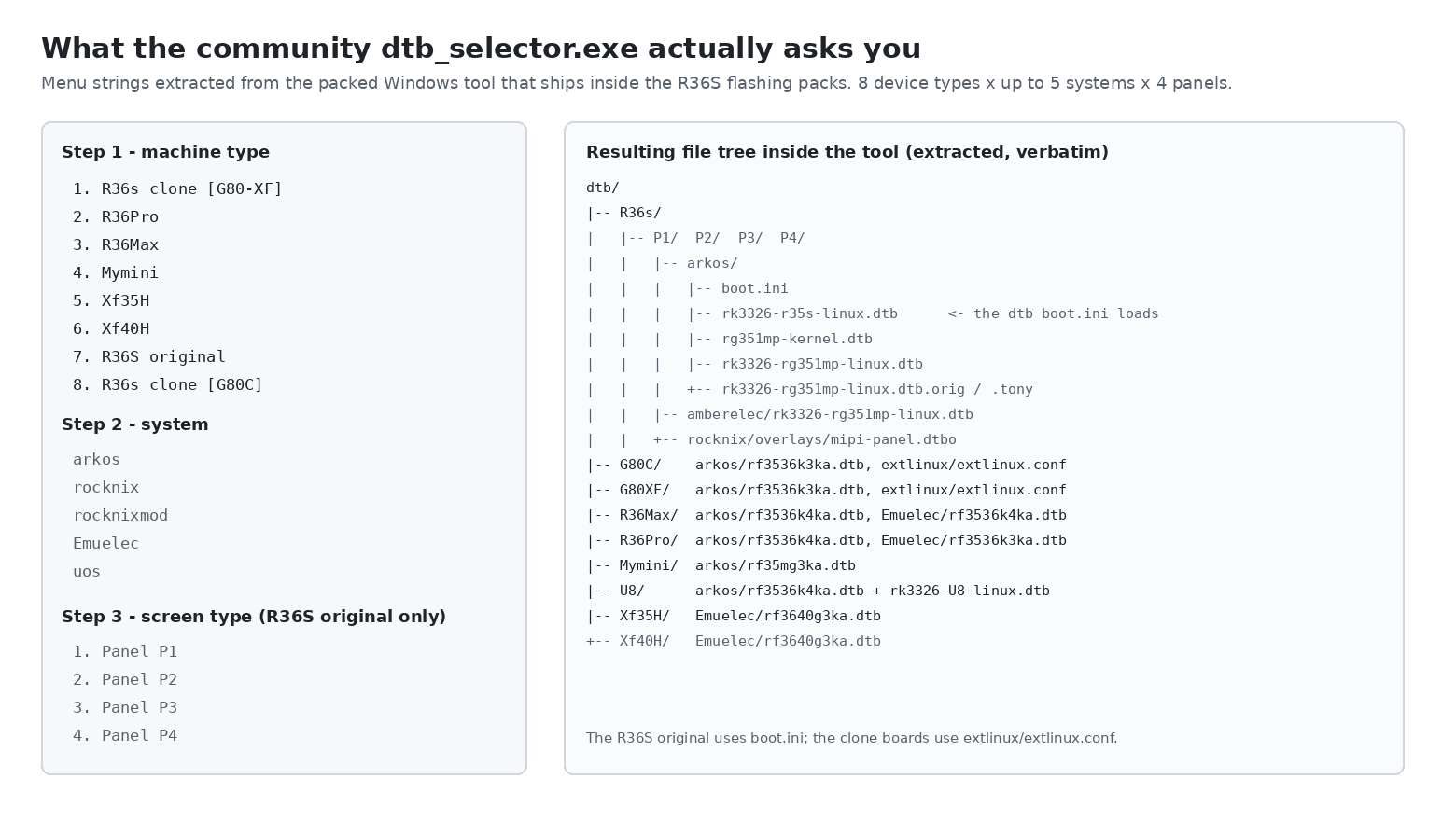
Two observations from that tree are worth more than any general advice. The original R36S uses a named boot configuration; the clone boards use extlinux. They are different mechanisms with different edit points. And the Panel 4 folder carries a readme whose entire content is: "60hz DTB for Panel 4. Note: the 60Hz variant is experimental. We'd be happy to hear from any issues you encounter compared to the stock 77Hz mode." So a panel variant can itself have more than one valid device tree, and the 60 Hz one is labelled experimental by its own author. If Panel 4's 60 Hz file misbehaves, that is a known position, not a mystery.
Questions we get asked
Can a wrong device tree brick an R36S? Usually not. It is a file on a FAT32 partition that any PC can mount, so the standard recovery is to put the correct file back.
Do all units of the same board revision use the same device tree? No. Board revision and panel variant are independent axes, and the supported-device list enumerates six separate original-R36S screen entries plus separate clone and SoySauce families.
The screen is on but black — the backlight glows. Is that a device tree problem? It is consistent with one. The backlight is driven independently of the display data path, so a panel that never receives a lockable timing set can still be lit.
Can I just copy someone else's file? Only if their board revision and panel variant match yours. Panel 1 and Panel 4 in the same board family produce different refresh rates — 68.5 Hz against 59.9 Hz — from files that declare the same resolution and the same panel controller.
Sources
Primary sources are files we inspected directly: a community R36S flashing pack containing its Windows device-tree selector, a flashing tool, a compressed device tree archive and a photograph of the boot partition layout; the 85 files unpacked from the selector tool, including 40 device tree files across nine board folders, their boot configuration files and a Panel 4 readme; a V12 note distributed with the flashing material; and board photographs of R36S V30 and V21 units with the shell open. For procedures and device lists we used the ArkOS4Clone project and its installation wiki, and the upstream ArkOS project, which is the original line these community images are built from. Corrections and additions are welcome — if you have a unit whose panel variant is not covered, the most useful thing you can contribute is the model string plus the blanking values from your working file.
Related reading
The card that asks to be formatted — including why a system card cannot simply be moved between units, which is the same device tree problem seen from the other side.
V12, V21 or V30 — the buying decision, and what the revision does and does not tell you.
Inside an R36S — board photographs at full size, including the V12 silkscreen this article describes but does not show.
First steps, the shop FAQ, and the bare R36S.