Field note · 11 October 2026
“You need to format the disk.”
The short answer
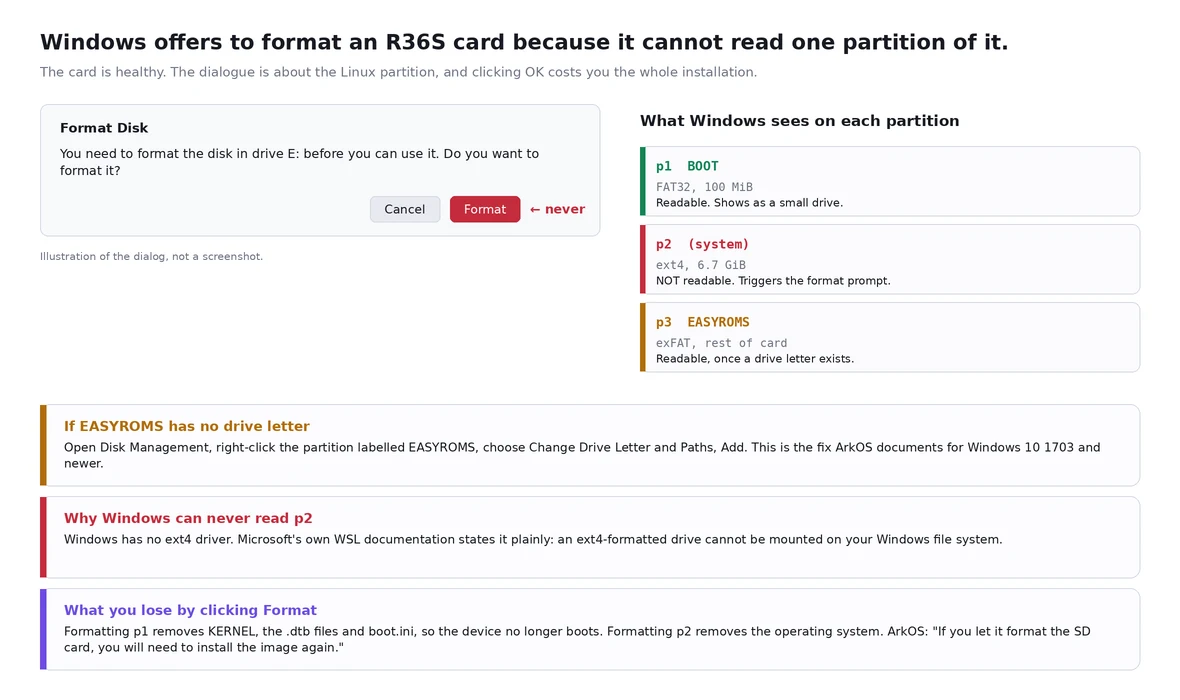
Click Cancel. The volume Windows is complaining about is ext4 — the operating system — and Windows has no ext4 driver, so its standard reaction to a removable volume it cannot identify is to offer to erase it. ArkOS's own instructions are unusually direct about this: "Once the image has been completed, Windows may ask you if you want to format the SD card. MAKE SURE TO CLICK CANCEL ON THIS QUESTION! If you let it format the SD card, you will need to install the image again."
Only two situations are real damage — the partition table is gone, or the card is dying or counterfeit — and neither of them is fixed by formatting either. Both are fixed by imaging the card to a file first, and then working on the copy.
1. What goes wrong, and how it looks
Three things get described to me, and they are not the same problem. A card that suddenly reads nothing, keeps saying it needs to be formatted, and will not open on the handheld either. A card that stops working after being read through a phone or an OTG reader — one owner had built up 320 games, a theme and a sorted library, then lost the lot in a morning that way; the boot partition still read and the roms partition had vanished. And the question that shows the real risk most clearly: the system is on the card, so if it is formatted, is that the end of everything?
That last question is correct, and worth taping to the card reader. Two of these cases also get answered directly below: the volume Windows cannot read is the Linux one, not the games, and the game card is portable but the system card is not, because the system card carries the kernel and the device tree for one specific board.
2. The card has three partitions; Windows can read two of them
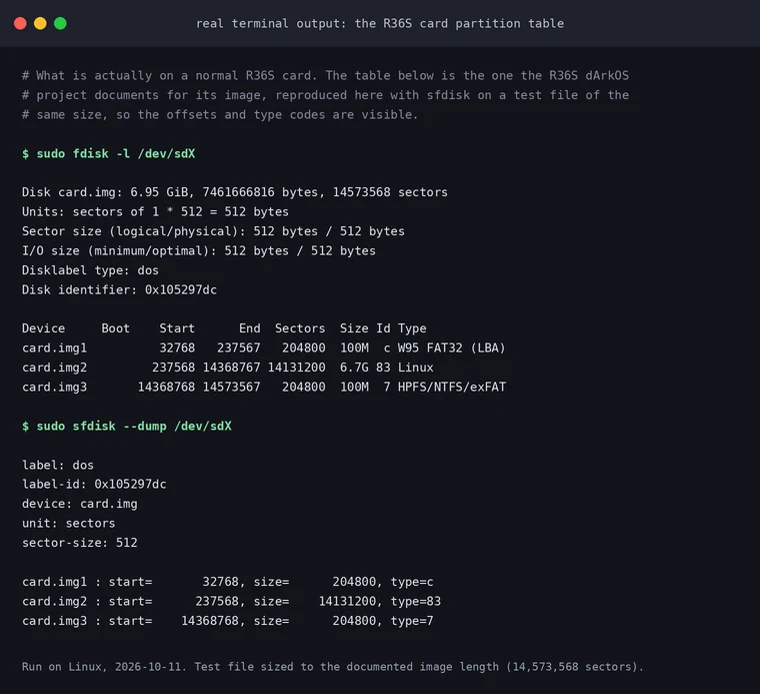
A normal R36S card is an MBR table with three partitions. Partition one starts at sector 32768, is 100 MiB, carries type code 0c and holds KERNEL, the .dtb files and boot.ini — that is BOOT. Partition two starts at 237568, is 6.7 GiB, carries type code 83, and is the ext4 operating system. Partition three starts at 14368768 as a 100 MiB placeholder with type code 07, named EASYROMS, and is grown to fill the card on first boot.
BOOT is FAT32, Windows reads it, and it is the small drive that appears first. EASYROMS is exFAT and Windows can read that too — if it does not appear, that is usually a missing drive letter rather than damage, and the documented fix is a drive letter, not a format.
The middle partition is the problem. Microsoft's own documentation says it without hedging: "If you have an Ext4-formatted drive, you cannot mount it on your Windows file system." Windows sees a volume with an unknown filesystem, and offers to fix it.
3. Why the missing drive letter case is so common
The ArkOS documentation addresses Windows 10 1703-and-newer users specifically: if you do not see a drive letter named EASYROMS, open Disk Management, right-click the partition carrying that label and assign a drive letter. You normally only need to do this once per PC. The dArkOS documentation has the same page for the R36S, and names both BOOT and EASYROMS as the two filesystems that can go missing from Explorer for exactly this reason.
One widely suggested workaround is worth ruling out: you cannot use wsl --mount for this. Microsoft's documentation is explicit that the command does not currently support USB drives, flash drives or SD card readers, and that it requires administrator rights and Windows 11 — or the Store version of WSL. Any guide telling you to mount an R36S card in WSL does not work. And on an R36S card you do not need it, because the partition that holds your games is exFAT, which Windows reads natively.
4. What clicking Format actually costs
Format the FAT32 boot partition and you lose KERNEL, the .dtb files and boot.ini. The device will not boot. The card still holds your games, but you now need a re-flash to use them.
Format the ext4 partition and you lose the operating system. This is the partition Windows is usually complaining about, and it is the one with nothing on it that Windows can show you — which is exactly why people click OK.
Format the exFAT games partition and you lose the games and the roms folder structure. Recoverable by copying files back, but you must not delete the folders the emulators depend on: ArkOS warns that the PSP and NDS folders contain files those emulators need.
Formatting is not a "reset the card to a known good state" button on a device whose operating system lives on the same card.
5. The two cases where the card really is damaged
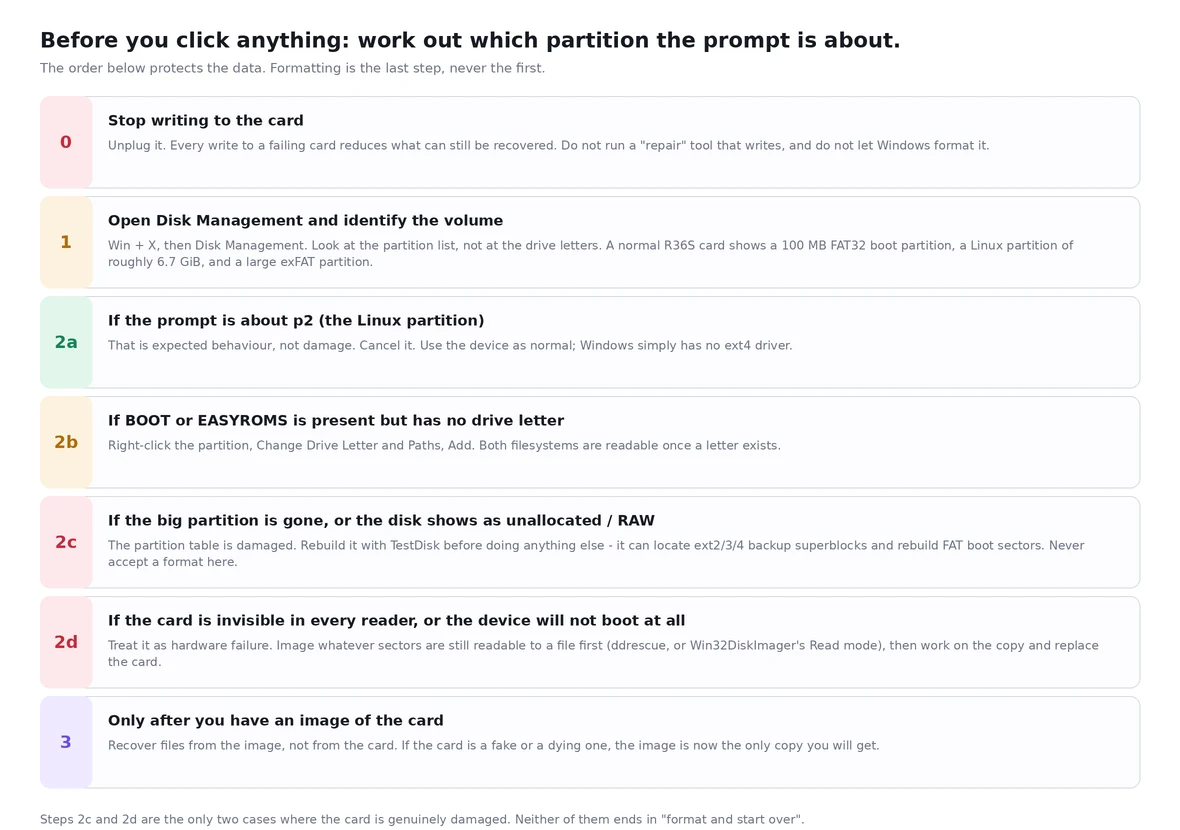
The partition table is gone. Disk Management shows the whole card as unallocated, or the large partition shows as RAW, and the device does not boot. Windows will happily offer to "fix" this by creating one big empty partition — which overwrites the table that still points at your data. TestDisk exists for exactly this: it reconstructs a lost partition table, recovers FAT boot sectors from their backups, and can locate ext2, ext3 and ext4 backup superblocks.
The card is dying or counterfeit. It disappears from every reader, or the device will not boot even though the same card worked yesterday. The owner who lost 320 games after reading the card through a phone is describing this class of failure. Copy whatever sectors are still readable to an image file, then replace the card. A card that has started doing this does not come back.
A third possibility is worth ruling out: a fake-capacity card that reports 128 GB and really has 8 GB, so everything past the real capacity silently overwrites itself. f3 on Linux and macOS and h2testw on Windows test for this. An owner who found their card was "actually only 90 GB" is describing the benign version of the same discovery.
6. Ground truth from a real unit
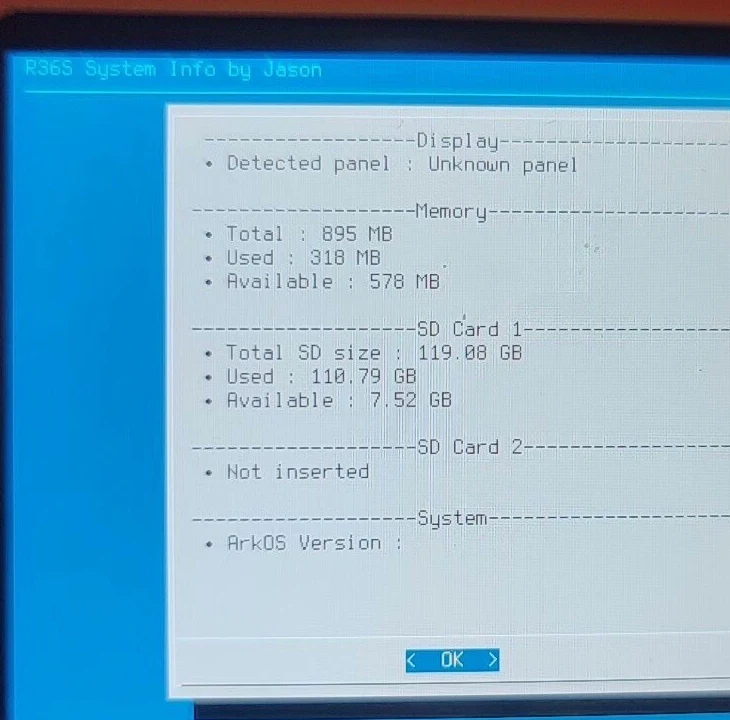
Two things are worth reading off that screen. SD Card 1 reports 119.88 GB, which is the figure you expect from a card in the 128 GB class — the usual decimal-versus-binary gap, not evidence of a fake card. And SD Card 2 is listed as a separate entry, which is the second slot. That second slot is what makes the "can I use someone else's card" question below interesting.
7. How to recover, in order
Step 0 — stop writing to the card. Unplug it. Do not run a repair tool that writes. Do not let anything format it. Every write to a failing card reduces what can still be recovered.
Step 1 — identify the volume. On Windows, Win + X then Disk Management. Read the partition list, not the drive letters: a healthy R36S card shows a ~100 MB FAT32 partition, a ~6.7 GiB Linux partition and a large exFAT partition. On Linux, with the card inserted, run lsblk -o NAME,SIZE,FSTYPE,LABEL,MOUNTPOINT and sudo fdisk -l /dev/sdX. lsblk gives you the filesystems and labels; fdisk -l prints the partition table with offsets and type codes. If fdisk reports a table that matches the one above, the card is structurally fine and the prompt was about ext4.
Step 2 — if the prompt was about the Linux partition, cancel it and carry on. Nothing is wrong. This is the normal state of a healthy R36S card on Windows. Read the games partition, which is exFAT. If you need to touch ext4, do it from Linux — and note that ArkOS specifically names Paragon Linux File Systems for Windows as a cause of corrupted cards, so that particular Windows ext4 driver is the one to avoid.
Step 3 — image the card before you attempt any repair. This is the step people skip, and it is the only one that makes the rest safe. sudo dd if=/dev/sdX of=~/r36s-card.img bs=4M status=progress conv=fsync.
Use ddrescue instead when the card is failing, so a bad sector does not end the copy: sudo ddrescue -d -r3 /dev/sdX ~/r36s-card.img ~/r36s-card.map. The -d flag bypasses the kernel cache, -r3 retries bad areas three times, and the third argument is the mapfile, which lets you resume and tells you exactly which regions never came back. On Windows, Win32DiskImager does the same job; its own documentation describes it as designed to write a raw disk image to a removable device or back a removable device up to a raw image file, and it recommends doing a Read before you ever write to a device.
Then work on the image file, or on a copy of it. Nothing you do from here can make the card worse.
Step 4 — if the partition table is missing, rebuild it. Run TestDisk against the card or the image. Accept the proposed table only after checking the listed partition sizes against the table above — 100 MB, roughly 6.7 GiB, then the rest.
Step 5 — get your files out. On Windows, DiskGenius documents reading and recovering EXT4, EXT3 and EXT2 partitions, and it can browse and copy files off a partition Windows itself refuses to mount. For deleted or badly damaged filesystems, PhotoRec carves files out by content and does not care that the directory entries are gone — it cares about the file signatures.
Step 6 — if you only need the card to work again, re-flash rather than repair. A dd image of a known good card, or the original image from the project, restored with dd, Rufus or USB Image Tool, is faster and far more reliable than repairing a damaged ext4 partition by hand. Then copy your games back.
Step 7 — check the filesystems, and only then trust the card. sudo fsck.vfat -n /dev/sdX1 is a read-only check that changes nothing; if it reports problems you can re-run it without the -n to let it fix them. sudo e2fsck -f -y /dev/sdX2 forces a full check and answers yes. Running e2fsck against a mounted filesystem is a bad idea, and you should run both against the image first if the card is suspect.
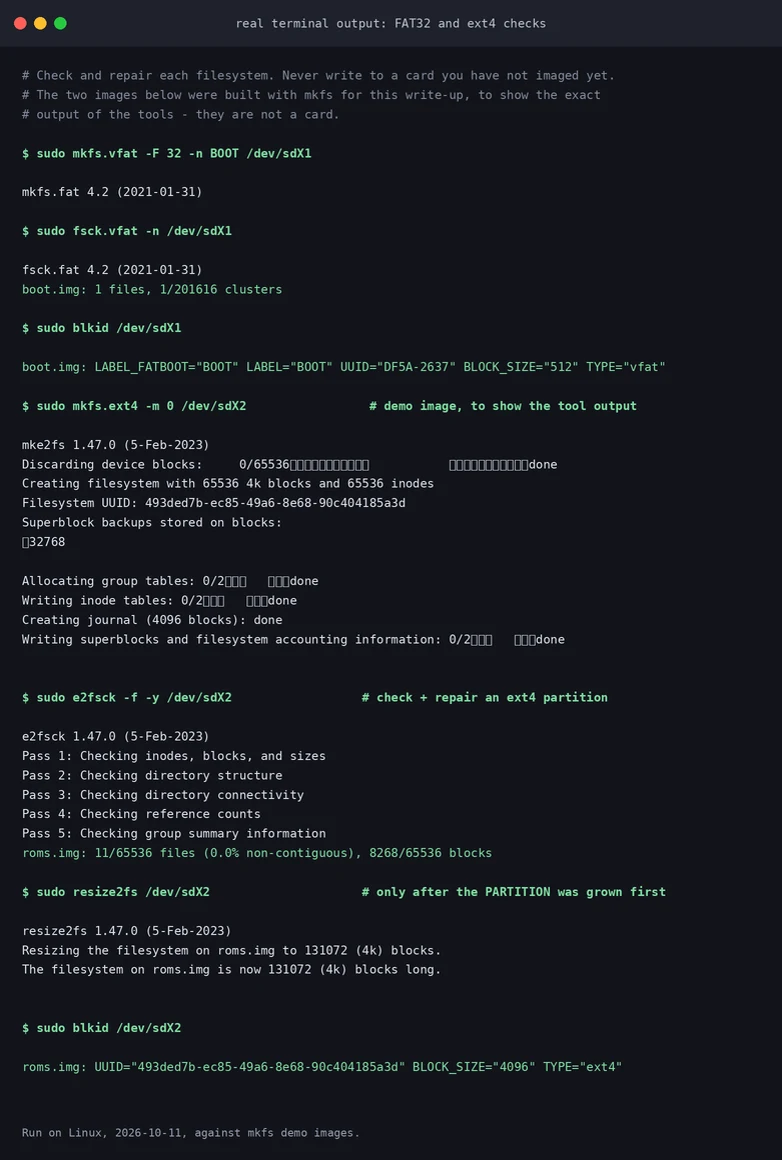
⚠️ Not tested here: everything in the Windows column above is quoted from the vendor's own documentation. We do not run Windows, so we did not execute DiskGenius, Win32DiskImager or h2testw ourselves. The Linux commands were run while writing, against test images.
8. Backing up, cloning, and other people's cards
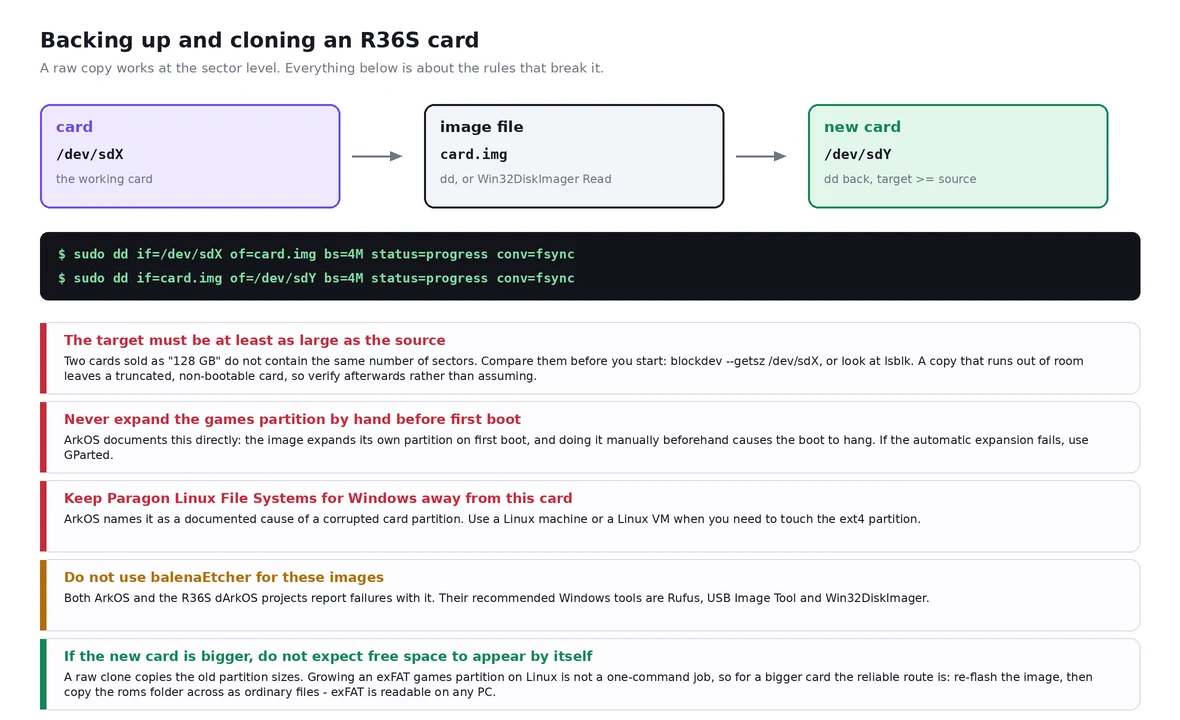
A whole-card copy is a sector-level copy: it carries the partition table, the boot sectors and both filesystems. Check the sizes before you start. blockdev --getsz /dev/sdX prints the capacity in 512-byte sectors; lsblk prints it in bytes. Cards sold as the same capacity do not have the same number of sectors. Our own unit reports 119.88 GB, and another card in the same capacity class can easily be a gigabyte or two different. If the target is smaller than the source, the copy runs out of room partway and leaves you with a truncated card that looks plausible and does not boot. This is exactly the mechanism behind the report that cloning a 32 GB card "needed a 64 GB card": sector-level cloning wants a target at least as large as the source, so clone onto a card that is the same size or bigger, and confirm the target's size first.
⚠️ Not tested here: we did not test AOMEI Backupper. The rule above is a property of sector-level copying, and the AOMEI report is one owner's experience, not a documented specification.
Three things not to do. Do not expand the games partition by hand before the first boot — ArkOS documents this in capital letters: the image expands that partition itself at first boot, and doing it manually beforehand makes the boot hang. Do not use balenaEtcher for these images — ArkOS says so explicitly, and the R36S dArkOS projects repeat it; their recommended Windows tools are Rufus, USB Image Tool and Win32DiskImager. Do not assume a bigger card gives you the extra space for free — a raw clone copies the old partition sizes, so the extra space stays unallocated, and growing an exFAT partition on Linux is not a routine one-command operation. The reliable route for a bigger card is to re-flash the image and then copy the roms folder across as ordinary files.
9. Are game cards from different sellers interchangeable?
A games-only card, yes — within limits. The games live in roms/<system>/ on an exFAT partition, and that partition is just files. A card prepared for one R36S works in another R36S as long as the second unit is told to read it: the second-card slot has to be enabled in the settings, and it expects a filesystem it can mount. Nothing about it is board-specific.
A system card, no. The boot partition carries KERNEL, boot.ini and the .dtb device-tree files, and the device tree is matched to one specific board revision and one specific panel. The R36S dArkOS project maintains a matrix of them, each with its own folder in the boot partition: V12 with two panel variants, V21, V22, Y02, the HL-R36H-V20, the G80C and G80CA clone boards, and the Y3506 variants. Drop the right .dtb in and the device boots; drop in one from a different board and you get exactly the symptom people describe as a black screen after flashing. That is covered in detail in our device tree note.
One thing that matrix makes concrete: as we read it, it covers V12, V20, V21, V22, Y02 and the clones — and no V30 profile. That matches what we hear from V30 owners, who go looking for V30 information and cannot find it. If you own a V30 board, check the project's current release notes before assuming a profile exists for it.
⚠️ Verified when this was written, not a live fact: we read that supported-hardware table on 11 October 2026. Vendor lists change; check the source before relying on it.
⚠️ Not tested here: we do not have a V12 and a V21 or V30 unit side by side to test card swapping. The matrix above is quoted from the R36S dArkOS project's own supported-hardware list.
10. How to check it worked
fdisk -l or Disk Management shows three partitions with the offsets above, and lsblk -o NAME,FSTYPE,LABEL shows vfat/BOOT, ext4 and exfat/EASYROMS.
The device boots to the frontend and the game count matches what it was before.
Both filesystem checks come back clean. A card that keeps producing errors on repeated checks is a card to replace, not to keep repairing.
A known file reads back correctly. Copy a large file off the card and compare its hash with the original. On a card you suspect of being fake, that read is the whole point of the test.
If you cloned, verify the clone too. Do not assume a copy succeeded because it did not print an error. Compare stat -c '%s' ./r36s.img and sha256sum ./r36s.img against the hash of the same number of bytes read back from the card: sudo head -c IMAGE_SIZE /dev/sdX | sha256sum. The two hashes must match exactly. If they do not, the card is not a faithful copy, and re-writing it is the fix — not troubleshooting the handheld.
11. How not to step on this again
Back up the card the day it works. A dd image or a Win32DiskImager Read costs twenty minutes and turns "I lost 320 games and the theme I built" into "I restored the image".
Keep the system card and the games card separate. Then a formatting accident costs you a folder of files, not an installation.
Do not sort files on the card through a phone or an OTG card reader. That one comes from an owner who lost 320 games to exactly that, and the mechanism — power or the connection dropping mid-write on removable media — is not something the card can defend itself against. Shut the device down properly, take the card out, and use a real card reader on a computer.
Buy a name-brand card and test it once. ArkOS: minimum 8 GB, 16 GB or more strongly recommended, and "do not use low quality or no name brand SD cards — those will most likely fail quickly, cause inconsistent emulation performance, or fail in booting up."
Never answer "yes" to a format prompt you have not identified, and never repair a card you have not imaged. The image is your undo button; without it, every repair attempt is irreversible.
Eject properly, and shut the device down before removing the card. The R36S's own guides say the same thing.
Sources and limits
The partition table, the first-boot expansion, the board and panel device-tree matrix and the "Rufus is the only supported flashing software" position come from the dArkOSen-R36S wiki installation page. The format prompt warning, the drive-letter fix, the PSP and NDS folder dependencies, the image-hash verification recipe, the balenaEtcher and Paragon warnings and the minimum card sizes come from the ArkOS wiki. The second-slot filesystem list and the 1002:1002 EXT4 warning come from the ArkOS FAQ. The ext4 and wsl --mount statements are quoted from Microsoft Learn. TestDisk and PhotoRec details come from CGSecurity. The fake-capacity tools are f3 and h2testw. The failures in section 1 are the ones owners bring us, described as patterns rather than as measured frequencies — we have not counted how often each occurs.
Related reading
Games on the card that never show up — the companion note to this one, and the more common problem by far.
V12, V21 or V30 — what a board revision does and does not tell you.
First steps, the shop FAQ, and the bare R36S.