Field note · 15 October 2026
ArkOS, ROCKNIX, or the system it came with.
The short answer
An R36S arrives with a working system on it, so flashing is optional. If you do want to change it, there is no single best choice, because the question “which system” is only half a question. A system is a stack of layers, and one of those layers — the device tree — describes the specific board and the specific LCD inside your unit. An image that boots perfectly on someone else's R36S can give you a black screen on yours without printing a single error.
So the order that works is: find out which board you have, then pick a project, then follow that project's own instructions. Not the other way round. We name projects and link to the ones with a project home we have checked. We do not link package downloads, ROM sets or file-sharing mirrors, and we are not going to recommend one project over another on the strength of a forum thread.
The rest of this page is the detail behind those three sentences.
1. The question as it actually arrives
We went through a corpus of roughly 7,500 messages from public Chinese-language handheld groups to find out what people struggle with. Flashing was the densest topic in it, and the striking thing is that almost nobody was asking which system is better. They were asking for one that fits.
From the group r36s(开源掌机)交流1群, a new owner: “bought a new unit, have to flash it myself, tried the dtb many times and it's a black screen every time. Looked in the group files and there's nothing about the v30.” The same person again: “came here looking for a v30 dtb; tried several firmware images, none of them has a dedicated one, so I came here to look.”
From 开源掌机中文社区⑤群, a run of short lines that reads like a whole evening: “the thing is I can't find an image file that works” / “there's no matching dtb” / “a dtb issue” / “the dtb wasn't picked right” / “is there any image that works on this board”.
And from r36s(开源掌机)交流1群, one more that will sound familiar to anyone who has helped a friend: “this 3.6 GB ARKOS flashing file — does it come with games inside?”
⚠️ About these quotes: they are translated from the original messages by us, so the wording is ours even where the meaning is theirs. We quote the group and never the person — the corpus has no speaker attribution we would trust, and these are ordinary people asking ordinary questions, not sources to be named. The corpus carries no usable time range either, so treat these as the shape of the problem rather than as a dated sample.
2. What a “system” actually is on this handheld
People talk about “the system” as one thing, and that is where the trouble starts, because on this hardware it is four layers stacked on each other and only one of them is something you choose by name.
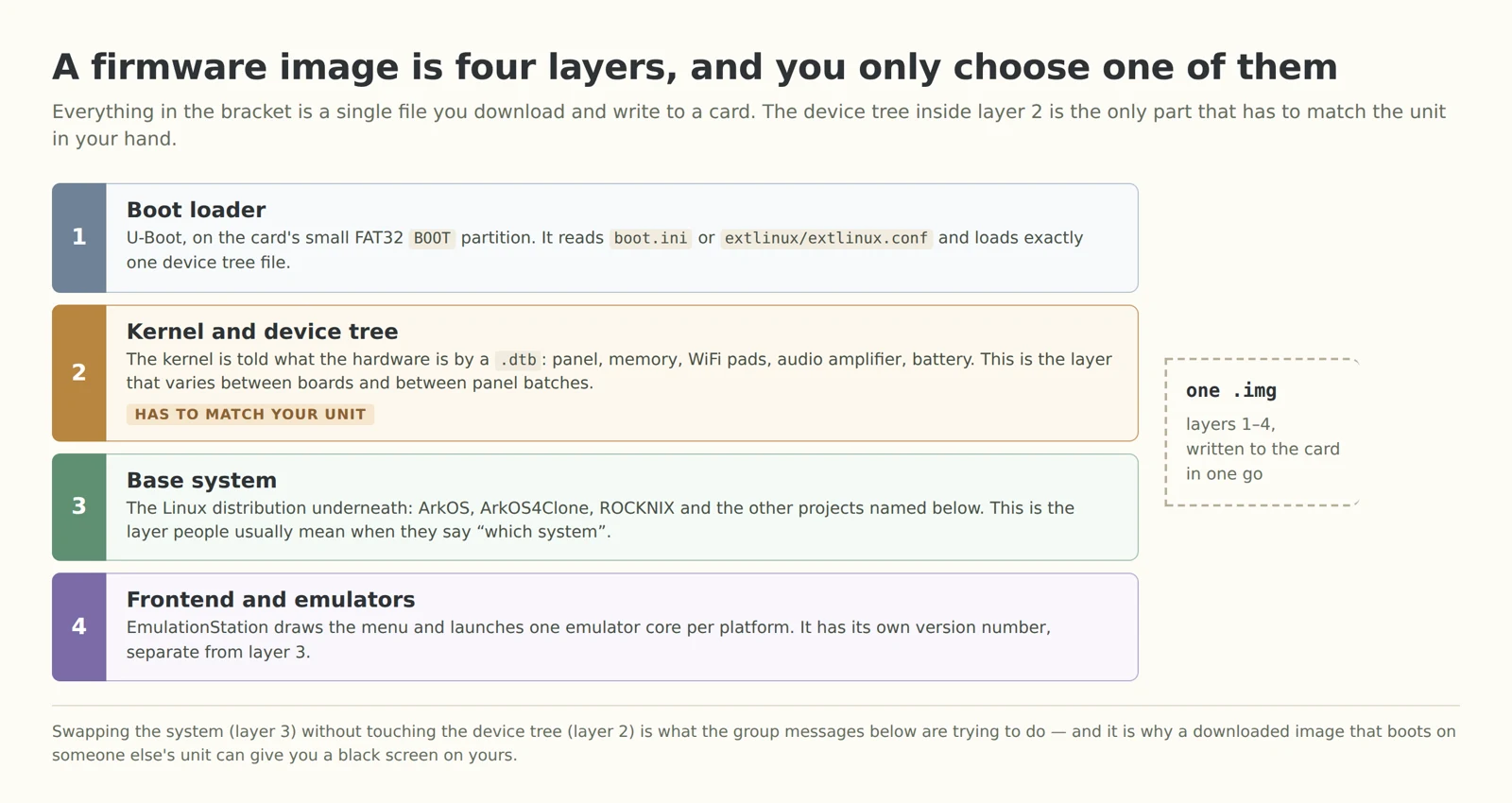
The bottom two layers travel inside the image you download. The boot loader and the kernel are the same in every build of a given project. The device tree is not: it is a description of the hardware, and it is generated per board and per panel batch.
The top two layers are where the visible differences live. The base system is a small Linux distribution; the frontend is EmulationStation, which draws the menu and hands off to one emulator core per platform. People usually say “ArkOS” or “ROCKNIX” when they mean layers 3 and 4 together, and they usually do not know layer 2 exists until it goes wrong.
3. Two version numbers, on a real unit
Both upper layers announce themselves, which is worth knowing before you flash anything — it is how you find out what you are already running.
![Photograph of an R36S held in one hand, showing a Chinese-language main menu; the highlighted line reads 魔改版 v4.7: ArkOS 2.0 (07312025-1)[AeUx] and the line below it reads EMULATIONSTATION V2.13.0.0 CHMOD BUILD 20250311000428](/images/owners/r36s-owner-photo-menu-cn-v1.webp)
Read the two lines at the bottom of that menu. The highlighted one is the base system, and it reads — quoted exactly as it appears, in a menu that is in Chinese — 魔改版 v4.7: ArkOS 2.0 (07312025-1)[AeUx]. 魔改版 means an unofficial or modified build. The line below it is the frontend: EMULATIONSTATION V2.13.0.0 CHMOD BUILD 20250311000428.
Two things follow from that, and neither is a criticism. First, “which system am I on” has more than one answer, and the menu is where you read both — so photograph this screen before you change anything. Second, a unit sold as running “the stock system” can have a modified community build on it, which is normal for this market and is why we say the software contents have to be confirmed in writing rather than assumed.
⚠️ One unit, not a rule: this is a photograph of one handheld, and we have no evidence that every unit ships with this build. The bracketed AeUx tag resembles the name that appears in a device-tree model string we parsed for the device tree article; we do not know that it is the same person and we are not asserting it. What we can say is only what the screen says.
4. The stock system is a real answer
Not flashing is a legitimate choice, and for a lot of people it is the right one. The system is already on the card, it already boots, and if the menu language or the emulator setup is acceptable to you then changing it buys you nothing except an evening.
What we can and cannot tell you about it: our supplier says the system is flashed before dispatch, and the medium it is flashed onto, and the software contents, are items we confirm in the written quote rather than on a web page — because they vary. We have not audited the image that ships on a unit, and we are not going to describe its contents as if we had.
Menu language is the one thing worth deciding before you buy, because it is the most common reason people reflash a unit that was working. From R36S掌机爱好者: “the original darkOS has no Chinese and it's really unpleasant… I flashed the darkOS that a guy called 凌晨 modified and it's quite good.” If you need a particular language in the interface, check that before you order rather than after.
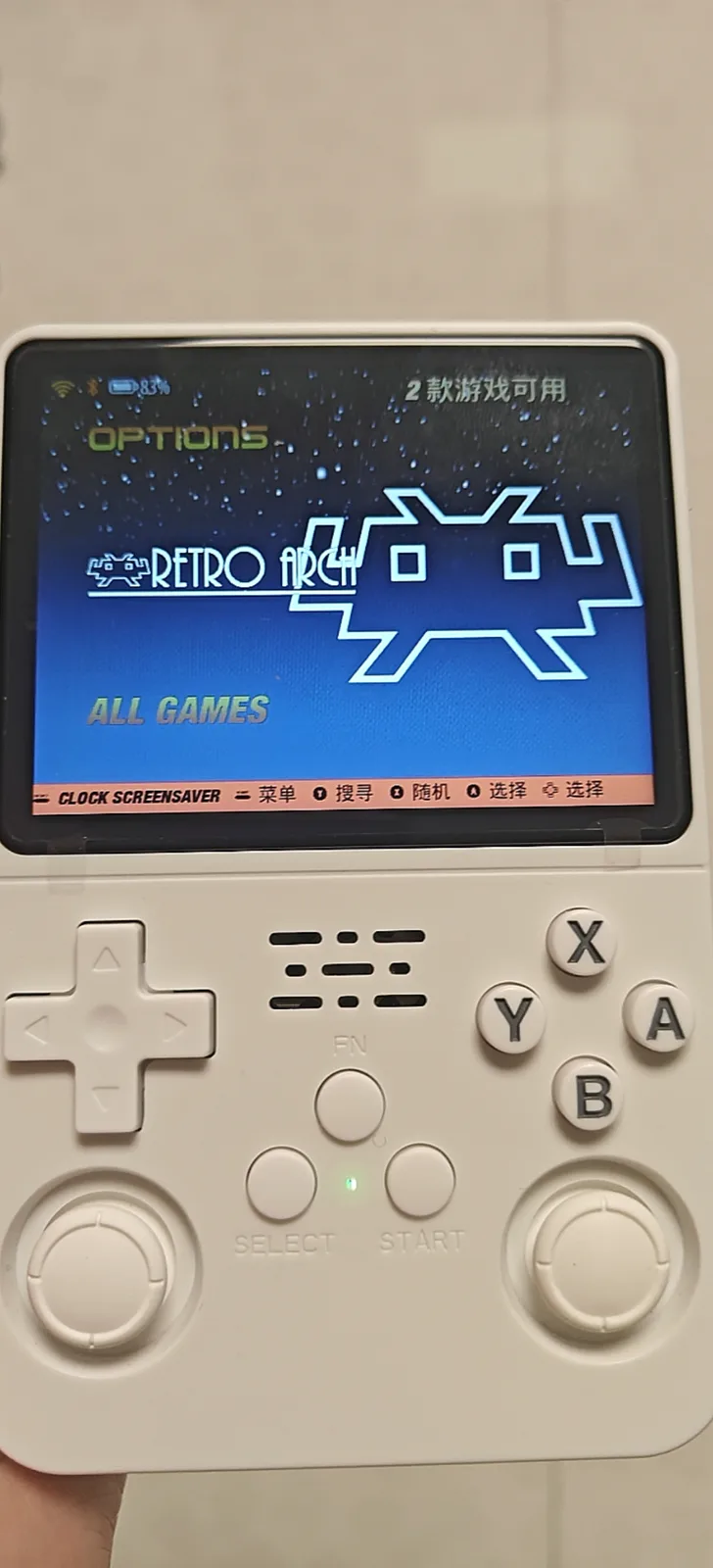
⚠️ Not verified: we do not know how many units in a batch carry which build, and the supplier has not given us a version history. If the exact software revision matters to you, the written quote is where to pin it down. The game count on that screen belongs to the menu; no games, ROMs or memory-card bundles are sold with this handheld.
5. The projects we will point you at
Two community firmware projects have a project home we have checked ourselves. Follow their own instructions from there — we are not going to retype an install procedure, because it changes between releases and a stale copy of it is worse than no copy.
- ArkOS4Clone ↗The project most often named for this board family. Its repository carries the release images and its own installation notes. The community board-identification database behind our identifier has a column for it, which is how we know which boards it claims to cover.
- ROCKNIX ↗A separate project with its own site, its own release notes and its own installation documentation. It appears in the same database under several entries, including a modification and a nightly channel.
Other names come up, and we are listing them so that you recognise them rather than because we can vouch for them: ArkOS and ArkOS K36, Arkos R3XS, UnofficialOS, AmberELEC and PAN4elec in the community database; darkOS, AURKNIX, uOS, Android and SteamOS in the group messages. We have no project address we can confirm for any of those, so they are named without a link. A name appearing here is not a recommendation, and a name not appearing here is not a judgement.
One standing rule of this shop: we do not link ROM sets, integration images or file-sharing mirrors, whichever project a pack came out of, and no game library is sold with the handheld. If your question is where to get the 3.6 GB pack, that question is out of scope here on purpose.
6. Why the board comes first
Everything above the boot loader is portable. The device tree is not, and that asymmetry is the whole reason the group messages in section 1 exist.
Two independent things vary inside one product name. The board revision — V12, V21, V30 — changes memory, WiFi pads, the audio amplifier and the battery parameters. The panel variant changes per unit even within one revision, because the factory swaps LCD suppliers between batches. The device tree you need is a point on that grid, and the outside of the shell tells you neither coordinate. We wrote the long version of that in the black-screen article, including the measured panel timings from four variant files that share a resolution and a pixel clock and differ only in blanking.
So before you pick a system, pick your board. Our device tree identifier reads your .dtb in the browser, hashes it, and shows which boards and which firmware projects a community database lists against it and against its screen parameters. It also shows the cases where the database itself cannot decide, which is more useful than a confident wrong answer. Nothing you open in it is uploaded.
⚠️ Not verified: a claim that circulates in the groups — “for the v30 you flash the newest arkos4clone, it already fixes the WiFi” — is consistent with the V30 shipping later and needing newer support, but we have not tested it and there is no mapping table we can point you at. Treat any table that tells you “V30 means package X” as unconfirmed.
7. How to verify a flash went right
The device tree being right is not the same as the install being right. Four checks, in order:
The picture locks and stays locked. No rolling, tearing, sideways shift or black band on one edge. A distorted picture is still a wrong device tree, not a partial success.
It survives a reboot. Coming up once and never again points at a badly written file or a failing card, not at your choice of project.
The frontend reaches its menu. If you get a working boot logo and then nothing, you have a layer 4 problem rather than a layer 2 one — a different thing to go and look up.
The version line says what you think it says. Photograph the menu screen in section 3 before and after. If the number did not change, the flash did not take.
⚠️ Not verified on hardware: we have not timed a first boot for each project, and those numbers move between releases. One number is safe to repeat because the community's own flashing notes give it: the first power-up after a flash resizes the card and expands the root filesystem, and can take a few minutes. Do not conclude anything in the first minute. We have not run these four checks as a procedure on a bench.
8. How not to step in it again
Photograph the working menu, then back up the card. The card is the whole system, so a copy of it is a working rollback. Imaging a card before you write to it is the single habit that turns a bad evening into twenty minutes — our note on the card Windows offers to format covers how to take that copy without destroying anything.
Do not let Windows or macOS repair a partition it cannot read. The system partitions are Linux filesystems, so the offer to format them is normal and clicking it is not.
The image is not the game pack. A 3.6 GB system image is an operating system plus emulators, which is why it is that size. Games live in their own per-platform folders, and getting them recognised is a separate problem — the five things that stop a ROM launching is our notes on that.
Never mix device trees between projects. Both projects say this about their own tooling and both mean it. A file that works under one boot mechanism can be the wrong file under another.
A black screen is usually not a brick. The device tree is an ordinary file on a FAT32 partition that any PC can mount, so the repair is usually putting the right file back. Treat “bricked” as a last hypothesis — the black-screen article is the procedure.
A second card is a second system, not a dual-boot. People do ask how to run two systems on one unit. Since the whole system lives on the card, the arrangement we can describe without guessing is one card per system — swap the card, swap the system. Do not swap a card between two units and expect it to boot: the card carries a device tree for one machine, which the card article explains from the other side.
Questions we get asked
Do I have to flash it? No. It arrives with a system on it. Nothing in this shop's product or support depends on you replacing it.
Will flashing delete my games? The image contains the system, not a game library, and writing an image to a card replaces what is on that card. Take a copy of anything you care about first — that is the whole reason section 8 starts with a backup.
Which one runs PS1 and N64 better? We have not benchmarked the projects against each other and we are not going to guess a number. The choice people regret is almost never the one between two maintained projects; it is an image built for a different board.
Can I put the stock system back? Only from a copy you made of the card before you changed it. The supplier's image is not something we can hand out — we do not have a distributable copy of it, and it is not ours to distribute.
Will you walk me through flashing? We point at each project's own documentation, which is maintained and current, rather than a copy of it on this site that would go stale. If you get stuck on hardware — it will not power on, it will not charge, the card is unreadable — that is ours and you should contact us.
Sources
The group quotes come from a corpus of public Chinese-language handheld groups, roughly 7,500 messages across nine groups with message bodies; we keep the file, and it carries no usable time range and no speaker attribution, so nothing quoted here is attributed to a person. Project statements and device lists come from the ArkOS4Clone repository and from rocknix.org, both checked directly, and from a community board-identification database that we ported, translated and verified field by field for the identifier tool. The two menu photographs were taken by an owner on a real unit and show what they show. Panel timings, boot-file names and the first-boot resize come from files we inspected for the device tree article rather than from memory. Corrections are welcome — if one of the projects above has moved, tell us and we will fix the link rather than leave a dead one.
Related reading
The screen stays black — the device tree in full, including the four measured panel timing sets and the three different boot mechanisms the projects use.
The device tree identifier — read your own .dtb in the browser and see what the community database lists against it.
V12, V21 or V30 — the buying decision, and the long list of reasons not to buy this handheld at all.
Settings that will not stay changed — what to do once the system is running and the configuration does not stick.