Field note · 15 October 2026
Wi-Fi that vanishes when you unplug the cable
The short answer
On the unit we tested, the Wi-Fi chip is a USB device sitting on an internal hub, and the kernel responds to that outer cable as though it belongs to the same bus. Pull the cable and the log shows the hub and the Wi-Fi chip disconnecting together, about a second apart. Put it back and both re-enumerate, and the wireless interface returns.
It is not instant. It takes about half a minute. That number is the practically useful part: if your Wi-Fi vanishes, the cheapest thing to try is waiting thirty seconds before you start changing settings or reflashing anything.
What we do not have is the reason. The driver reports the outer port as not attached in every stage of our test, including while the bus underneath was working — which is the opposite of the tidy explanation. We have the observation, twice over, on one unit, on one board revision, and we are going to hand it to you in exactly that condition rather than dress it up.
1. A symptom that looks like a fault and is not one
Wi-Fi problems get reported in a shape that makes them hard to diagnose. “My Wi-Fi died” arrives with no event attached, because the event that caused it did not look like a network action — it looked like unplugging a cable, or plugging in a gamepad, or a settings change that had nothing to do with wireless.
We already disclose on our own pages that certain USB or network setting changes can require reflashing to recover Wi-Fi. That disclosure has always been a warning without a mechanism behind it. Part of what this page does is offer a candidate for it — clearly labelled as a candidate, because that is all it is.
And then there is the case that worries us most as a shop: someone whose Wi-Fi is gone, who concludes the module is faulty, and who flashes the unit. If the true cause is a bus event that resolves itself in half a minute, that reflash was unnecessary, and our own documentation is what told them to do it.
2. What the kernel says about the Wi-Fi chip
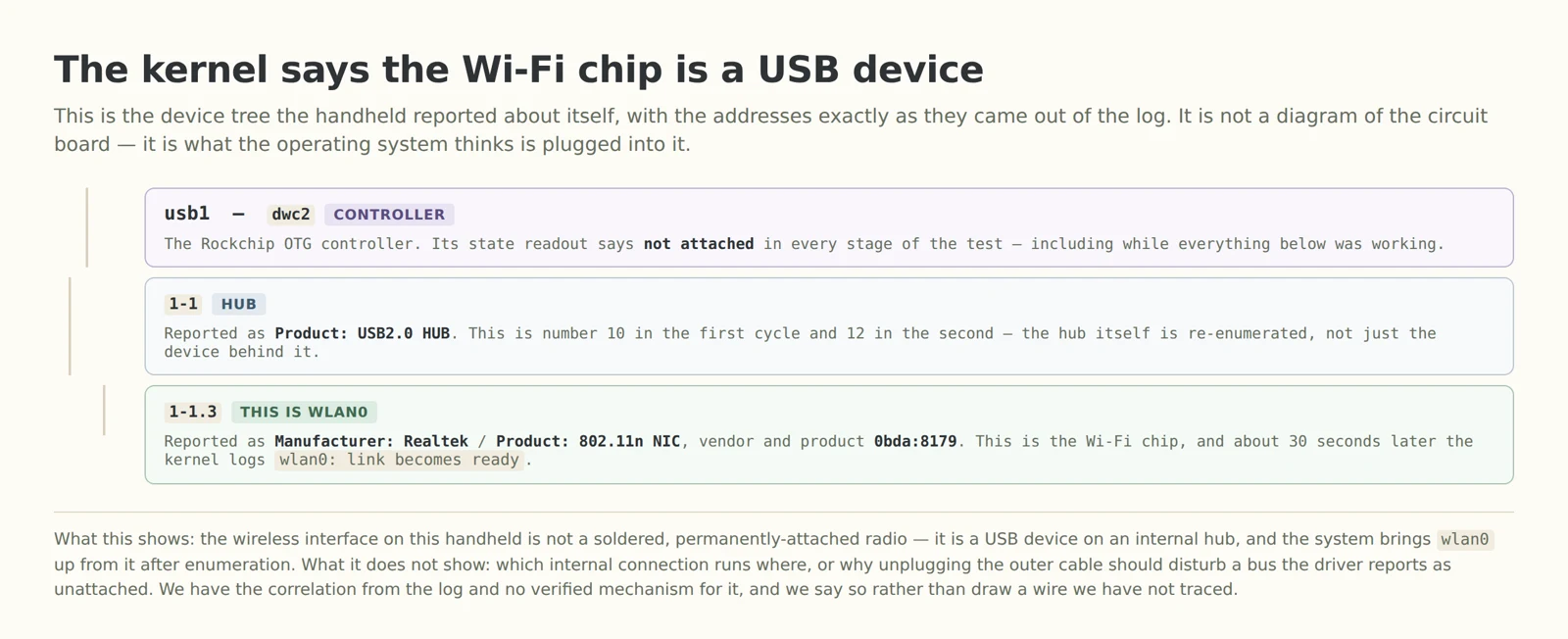
The wireless interface on this handheld is not a permanently-attached radio. It is a USB device at address 1-1.3, behind a hub at 1-1, on a controller running the dwc2 driver, and it identifies itself as a Realtek 802.11n NIC at 0bda:8179. The system brings wlan0 up from it once it has enumerated.
That is worth knowing on its own, because it changes what “my Wi-Fi is broken” can mean. A radio that is part of the board fails in one way. A USB device fails in the ways USB devices fail: it does not enumerate, it drops off the bus, it comes back with a different device number. Every one of those is visible in the log, which is why the log is where we went.
3. The evidence, unedited

Read the addresses and you can see the shape of it. In each cycle, 1-1 and 1-1.3 disconnect within a few hundredths of a second of each other — the hub and the device behind it, going down together. Then the hub comes back as a new device number, the NIC re-enumerates behind it, and wlan0 reports its link ready.
The hub being re-enumerated is the detail that matters. This is not a driver deciding the wireless interface is down; the hardware came off the bus and had to be found again.
There is also a limitation to state plainly, because it shapes what this evidence can be used for: the only channel we had for reading the device was the wireless link that was failing. So the outage itself could not be observed live — its shape is reconstructed from the kernel log, which records both the disconnect and the recovery after the fact. That is solid for what happened before and after. It tells us nothing about what the unit was doing during the thirty seconds in between.
4. How long the wireless is actually gone
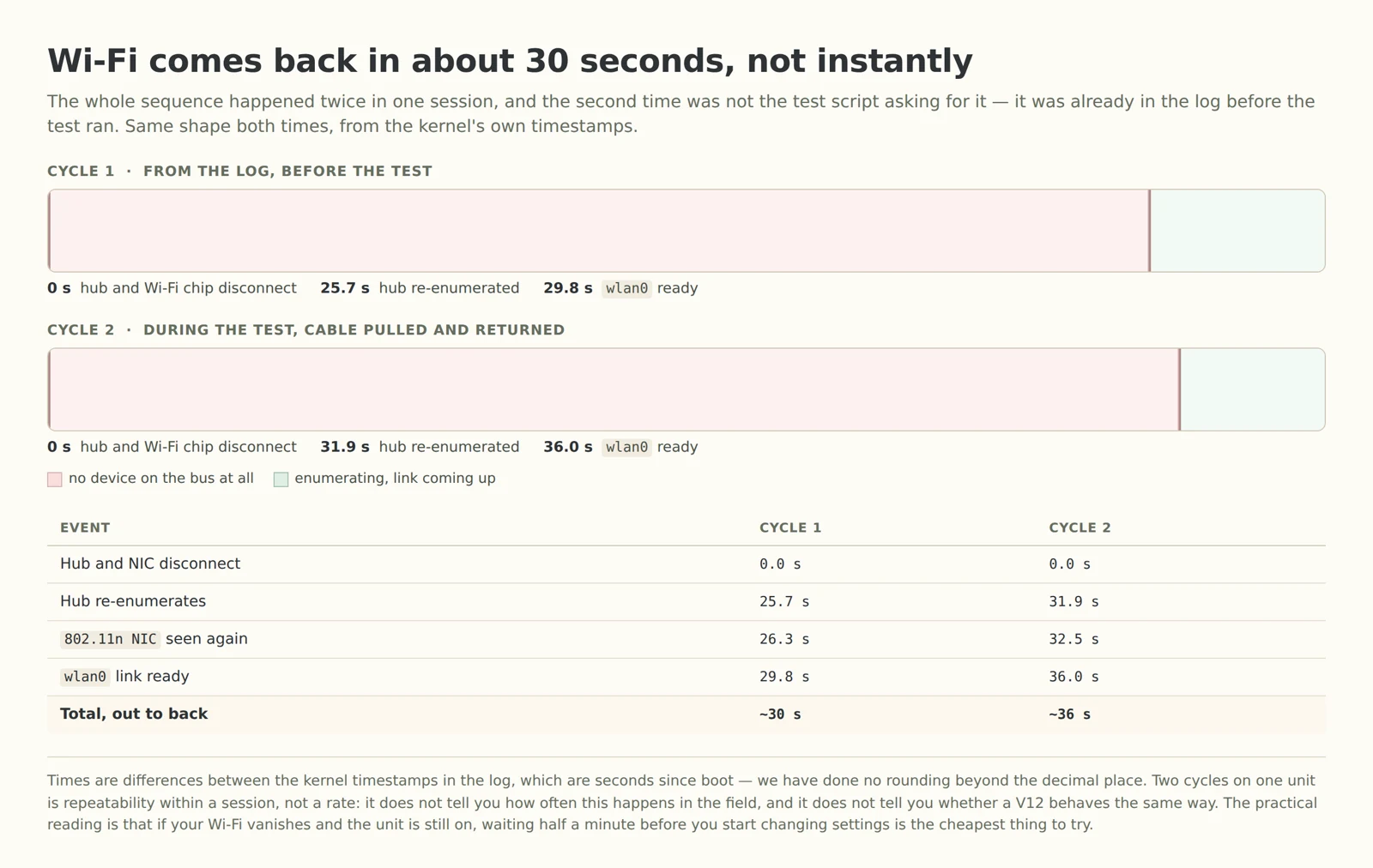
About thirty seconds, and both cycles agree on that to within six. The breakdown is the interesting part: in the first cycle the hub took 25.7 seconds to reappear and the interface was ready 4 seconds after that. Nearly the whole wait is the empty bus, not the wireless coming up — which suggests the delay is in whatever brings the hub back, not in the driver.
Practically: if your Wi-Fi drops and the unit is still on, give it half a minute. If it does not come back in that window, this page is not describing your problem and the honest next step is the shop you bought it from rather than a reflash.
⚠️ Reproduced, but narrowly: two cycles, one unit, one board revision. That is repeatability within a session and it is not a rate — it does not tell you how often this happens, and it does not tell you whether a V12 behaves the same way. We tested on a V30. If you have a V12 and you are willing to run the same check, that comparison is the thing this page is missing.
5. Why unplugging a cable does this — our candidate, not our answer
Here is where we have to be careful, because the obvious explanation does not survive contact with our own data.
The obvious explanation. The outer USB-C port is the OTG port; the internal hub and the Wi-Fi chip hang off it; so pulling the cable removes the port and takes the bus with it. It fits the observation perfectly.
Why we cannot just say that. Our test recorded the controller's own state readout in all three stages — cable in, cable out, cable back — and it returned not attached every time, including while the hub and the wireless interface above it were working normally. If the internal bus were attached to the outer port, that readout should not say that. We are not going to publish an explanation that our own evidence argues with.
So what we are left with is a set of candidates, none of which we have distinguished: the internal hub and the outer receptacle sharing a power rail or a gating signal; the controller's VBUS or ID sensing cutting the internal bus when the outer port changes state; or a power-management layer reacting to the change. All three would produce the log we have. We have not tested which one it is.
And the experiment that would settle it is cheap. Pull power only rather than the whole cable — a charge-only cable, or a data blocker on the port. If Wi-Fi survives that, the trigger is something on the data or ID lines; if it dies, it is power. We have not run that test. If you do, we would like to hear the result, because it is a two-minute experiment and this page is one experiment short of being able to give you a cause.
⚠️ Hypothesis, not finding: everything in this section is candidate reasoning. What is measured is the correlation between the cable and the bus, twice. What is not measured is any mechanism, and we are not presenting one as though it were.
6. Running the same check on your own unit
You need the unit on your network and a way to reach it over SSH. Nothing below changes anything on the device.
Read the bus first. List the USB devices and look for the Realtek NIC in the tree. If your unit shows the same 802.11n NIC behind a hub, the arrangement at least matches ours.
Then read the last entries of the kernel log — the log is in memory, and the messages we used are the USB disconnect, the USB re-enumeration, and the wlan0: link becomes ready line. Every one of them is a default kernel message, so you do not need to enable anything to see them.
Note the timestamp on the last “link becomes ready” line before you start. That gives you the baseline: if your log already contains a recent cycle, the behaviour was happening before you looked, which is exactly what we found on our unit — the first cycle in the evidence above happened before the test pulled anything.
Then pull the cable and put it back, and read the log again. Compare the new lines against the baseline. What you are looking for is the hub re-enumerating, not just the interface state changing.
Keep an SSH connection over a wired route if you can, because reading the device over the wireless link you are about to interrupt means losing the connection mid-check — the same limitation we hit.
7. What we are not claiming
That this is a fault. We do not know that it is one, and we equally do not know that it is not. What we have is a repeatable behaviour.
That it affects every unit. One unit, one board revision, one firmware. We tested a V30; we have not tested a V12, and the community firmware on a given unit may behave differently.
That it explains every Wi-Fi complaint. It explains a specific one — Wi-Fi lost at the moment something changed on a port, coming back on its own. A unit whose Wi-Fi never returns, or never appears, is a different problem with a different answer.
That this is the reason our own reflash warning exists. We think it is a plausible candidate and we have said so, in those words. We have not established it, and our buying pages keep the warning exactly as they were written.
That waiting thirty seconds is a fix. It is a workaround for one symptom on one tested unit, and it is the cheapest thing to try first. It is not a repair.
Questions we get asked
So is the Wi-Fi module faulty? On the unit we tested, no — the chip enumerated, worked, and came back on its own. A module that never appears is a different case and belongs with whoever sold you the unit.
Should I reflash to fix this? Not on the basis of this page. Our own buying note carries a warning that network settings can require a reflash to recover Wi-Fi, and we are not going to extend that into advice — a reflash is a bigger action than waiting thirty seconds, and this is exactly the situation where someone might take it unnecessarily.
Does the WiFi version always behave like this? We do not know. We tested one WiFi unit on a V30. We are not going to turn a single unit into a claim about the option we sell.
Will unplugging it damage anything? We have no evidence of damage, and we are not claiming safety either. What the log shows is a bus event, not an error, and the interface recovered on its own both times.
Which board revision did you test? A V30. Our buying note covers what differs between V12, V21 and V30, including which of them our WiFi module is offered on.
Sources
Everything measured on this page comes from one test session on one V30 unit on 15 October 2026: the USB device tree and the kernel log, read over SSH from the device itself. The two cycles and all the timings in the second figure are arithmetic on the kernel's own timestamps, which count seconds since boot; we rounded only to one decimal place. The screenshot is cropped to the region containing the evidence and is otherwise unaltered — we removed the parts of the full session output that identified the owner's own network and hardware, and no address, identifier or path from that output appears in this article. The tester's own read of the session, which proposed the same conclusion this page reaches, is not treated here as independent confirmation: it is the same measurement. The warning about network settings requiring a reflash is our own existing disclosure, published before this test and unchanged by it. The two candidate mechanisms in section 5 are reasoning about how USB power and sensing generally work, not findings about this board — we have not run the power-only test that would separate them, and we say so where it appears. Nothing on this page was produced by an image model; both diagrams are drawn, and the third figure is a photograph of terminal output.
Related reading
The light is on. The number is not moving. — the power side. Our session also recorded the unit reporting itself as discharging throughout, on battery, with the outer port connected, which is where that article's port position comes from.
V12, V21 or V30 — and who should not buy one — the WiFi module is an option on two of the three boards, and this page is why the disclosure table matters.
ArkOS, ROCKNIX or the system it came with — if you do end up reflashing, this is the page that says which system, in what order, and why the board comes first.
“I change a setting and it goes back.” — settings that do not persist, which is a different problem from a settings change that has a side effect.
First steps — what to do with a bare unit in the first hour.