Field note · 14 November 2026
A kernel that is younger than the handheld's owner.
The short answer
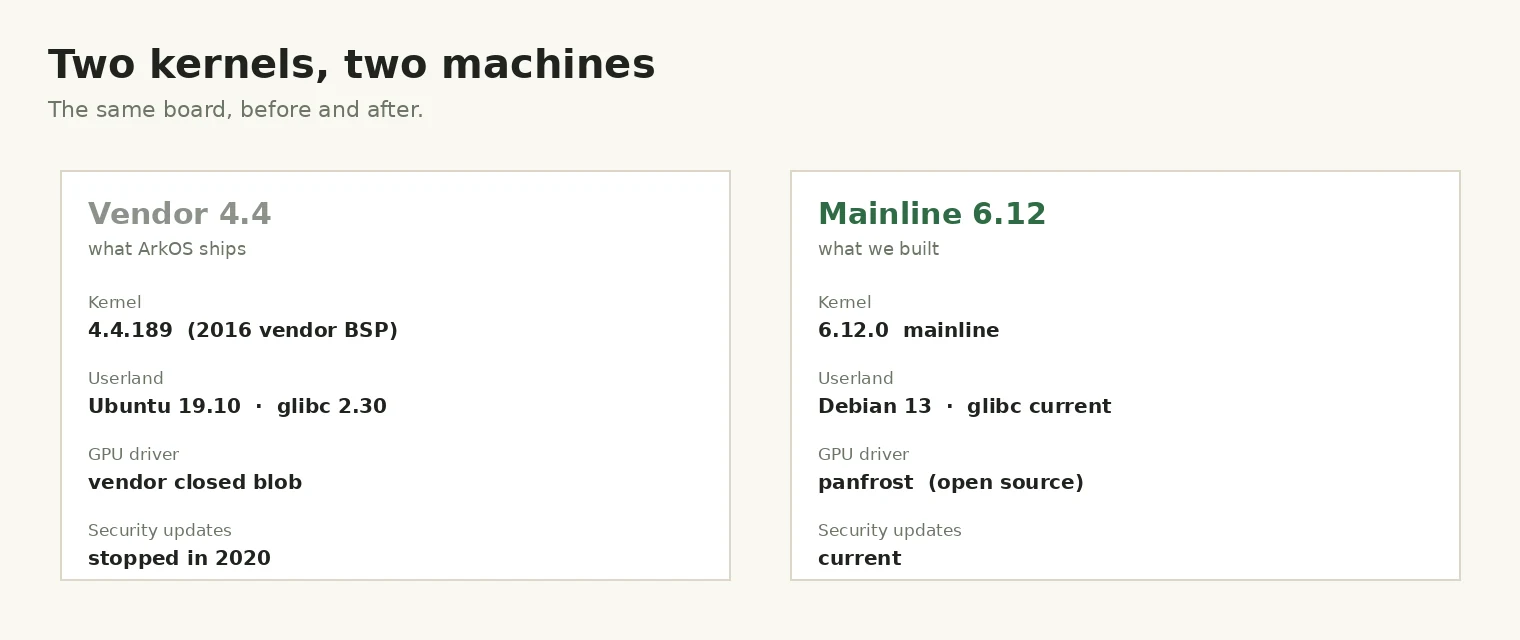
The board is capable; the software it ships with is not. An RK3326 with 1 GB of RAM is a perfectly reasonable emulation handheld. What holds it back is a vendor kernel pinned to 2016 and a userland library stack frozen at glibc 2.30.
Nothing in the modern Linux ecosystem supports that combination. Current Ruffle builds want glibc ≥ 2.32. Current Chromium wants ≥ 2.35. Even the vendor's own GPU driver is a closed binary that only matches one kernel version.
On 13 November we booted a self-compiled Linux 6.12 on the board, then rebuilt the userland on Debian 13 with the open panfrost driver for the Mali-G31. The menu runs on kmsdrm + Mesa. There is no vendor component left in the stack.
What we did not do: produce a flashable image, benchmark performance, or fix hot reboot. Those are stated as open at the bottom.
1. The display driver had to be written first
The vendor device tree describes the panel as a simple-panel-dsi with a 151-command init sequence attached. Mainline's panel-simple.c does not recognise that compatible string and does not parse init sequences at all. There is no path where the mainline kernel lights this screen without new code.
So the first deliverable was not a kernel configuration — it was a driver. The 151 commands were extracted from the vendor DTB and replayed through the mainline DSI API. That part is mechanical. The part that cost a day is in the next section.
2. Debugging with no serial port and no screen
This handheld has no exposed debug UART. When the screen does not come up, the usual instrument for kernel bring-up is gone. Two tricks covered almost everything.
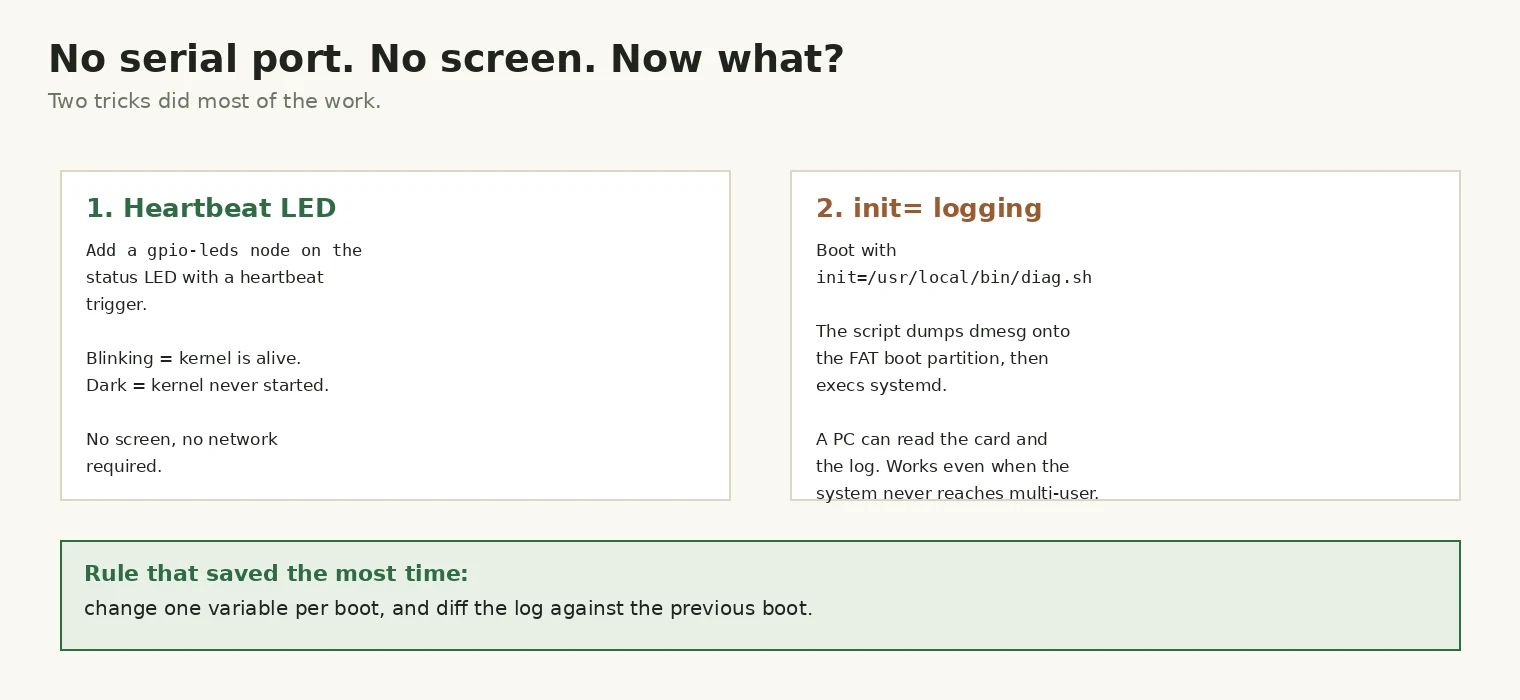
The heartbeat LED. A gpio-leds node on the status LED with the heartbeat trigger turns the device's own indicator into a liveness probe. Blinking means the kernel booted; dark means it never reached userland. That single bit of information separates "display problem" from "boot problem" before you read a single log line.
Logging to the boot partition. Passing init=/usr/local/bin/diag.sh runs a shell before systemd. It writes dmesg to the FAT32 boot partition and then execs systemd. Pull the card, read the file on any PC. This works even when the system fails before multi-user — which is exactly when systemd services are not yet available to help.
⚠️ Why this matters: a device that boots to a black screen tells you nothing. Within an hour of adding these two, every subsequent failure had a log attached to it.
3. Five failures that did not look like what they were
Every one of these presented as something other than its cause. The table is the summary; the notes below are the five that were hardest to place.
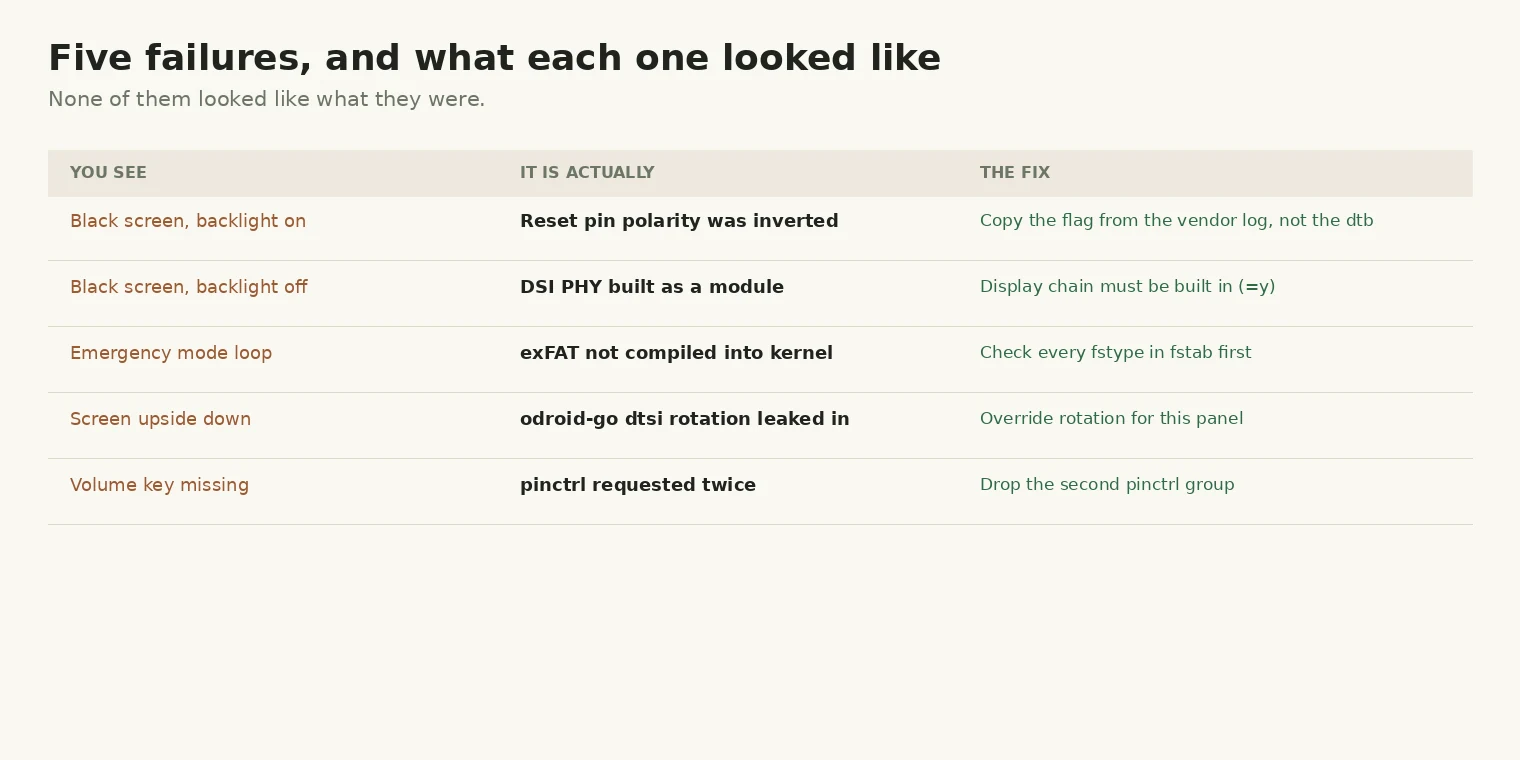
a. Black screen with the backlight on. Every driver message said the display initialised correctly — probe, prepare and enable all returned success. The panel was simply held in reset: the reset-gpios flag was copied straight out of the vendor DTB, but the vendor's own kernel log prints active = 0 for that pin, meaning active-high. Inverting it lit the screen immediately.
b. Black screen with the backlight off. The DSI PHY driver was built as a module (=m) and this kernel boots without an initramfs, so the module was not available when the DSI controller probed. The controller deferred forever and the panel driver never got a chance. On a device that boots straight from the bootloader, every driver in the display chain has to be =y.
c. An emergency-mode loop. /roms is exFAT and CONFIG_EXFAT_FS was not enabled. The mount failed, local-fs.target failed, systemd dropped to emergency mode and kept printing the same three lines. Before switching kernels, compare every fstype in /etc/fstab against the config.
d. The screen upside down. The shared RK3326 dtsi sets rotation = <270> for a different handheld's panel. Inheriting it rotates a 640×480 landscape display. Override it in the board's own DTS.
e. A missing volume key. Two pinctrl groups claimed the same pins, and the second request failed with could not request pin 64. The key worked in the vendor kernel because the vendor's groups were ordered differently. Removing the duplicate group fixed it.
4. What runs now
After the second day's work, the stack looks like this:
- Linux 6.12.0, four Cortex-A35 cores, self-compiled
- Debian 13 (trixie) userland, glibc current
- panfrost driving the Mali-G31 — OpenGL ES 3.1, Mesa 25
- EmulationStation on kmsdrm, rendering through Mesa rather than a vendor blob
- WiFi: RTL8188EU recognised and associated
- Panel: 4 lanes, 640×480, correct orientation
Cold boot reaches the system in about eleven seconds. The boot splash rotates through 21 stored images instead of showing one static logo. Audio plays through both the speaker and the headphone jack.
5. What does not work yet
This is the part that matters more than the list above.
- Hot reboot hangs. A warm restart stalls in u-boot reset and takes roughly two minutes to recover. Cold boot is fine. This is the highest-priority open fault.
- There is no image. Everything described here was built on one card, by hand. Nothing you could download and flash exists yet.
- No benchmarks. "Runs" is not "runs well". Frame times, peak memory and thermal behaviour under load are unmeasured, and on a 1 GB device with no zram that is not a detail.
- OTA is not designed. Overwriting
/usron a single rootfs is not a safe upgrade path; a power cut mid-write means an unbootable card.
⚠️ Not verified: how much of the above survives a second board. All of this was done on one V30 unit.
6. Check it yourself
If you have a booted TreeOS card, these are the commands that show the claims above are real rather than paraphrased:
uname -r                     # 6.12.0
cat /etc/os-release          # Debian GNU/Linux 13 (trixie)
dmesg | grep -i panfrost     # mali-g31 id 0x7093, Initialized panfrost
dmesg | grep -i panel        # probe ok, 4 lanes, 640x480
systemd-analyze              # cold boot timing
Related: why we stopped trusting a measurement we could not trace, and the cooling work that a faster, hotter SoC will eventually need.